
Summary of Second degree equation solver with Arduino
This Instructable guides users in building a second-degree equation solver using an Arduino, a 12-digit analog keypad, and an LCD display. The project allows input of variables a, b, and c to calculate solutions. It is suitable for electronics classes or microcontroller beginners.
Parts used in Second Degree Equation Solver with Arduino:
- Arduino board
- Medium size breadboard
- LCD Display (16 x 2)
- 12 digit keypad
- 4 buttons
- 1 potentiometer
- Resistors (16x 500ohm, 4x 1k, 1x 6k)
- 3 green LEDs
- Jumpers or striped wires
This instuctable is about making sort of a calculator that enables the user by using an analog 12-digit keyboard and 4 buttons to input the a,b,c variables into a equation and get the solution for it if there is any.(well if u don’t know what an second grade equation is probably u haven’t been in high school, even though you can follow this post to learn about microcontrollers.)
It can be a great electronics class project or an microcontroller starter project. for your own use.
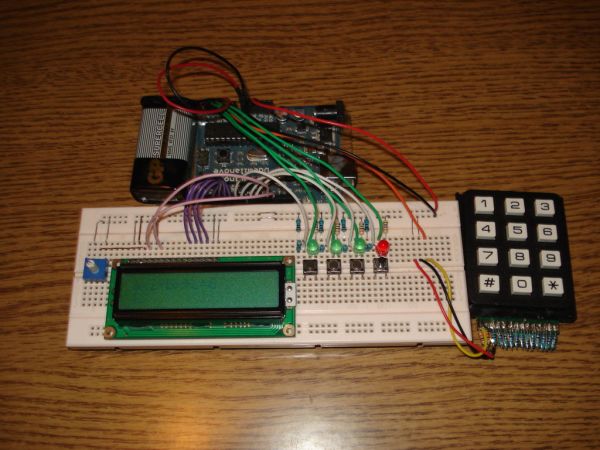
Step 1: Parts list
arduino board………………..http://www.oomlout.co.uk/arduino-duemilanove-p-185.html £24.17
medium size breadboard……http://www.oomlout.co.uk/breadboard-830-point-p-250.html £5.11
LCD Display (16 x 2)………………………http://www.oomlout.co.uk/lcd-display-16-x-2-p-212.html £7.15
12 digit keypad…http://cgi.ebay.com/Electric-Keypad-12-Button-Keyboard-24VDC-20mA-Max-/110690838563?pt=LH_DefaultDomain_0&hash=item19c5b02823 ……………………………$9.99
4 buttons………………………………………………………………………………………………….$1.00-0
1 potentiometer………………………………………………………………………………………..$1.00-0
16x 500ohm, 4x 1k, 1x 6k resistors ………………………………………………………..$2.00-1
3 green LEDs……………………………………………………………………………………………$0.25-0
lots of jumpers or striped wires ………………………………………………………………$1.00-0
And patients!!!!!!
tip: if u don’t have any of this parts it is highly recommended you buy an arduino starter pack that will include almost every electronic part needed, like potentiometers, wires, leds and maybe an lcd. a good one, which i bought ,is http://www.oomlout.co.uk/starter-kit-for-arduino-ardx-p-183.html
As for the tools, a soldering iron and a wire striper and cutter should be enough.
Step 2:
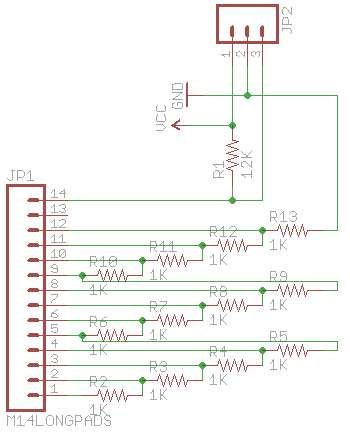
The first thing u have to built is the analog keypad.I will not get into every detail as there is already an instuctable which i followed to make it. http://www.instructables.com/id/Analog-Keypad-Backpack/
I made it using 500ohm resistors instead of 1k and instead of the 12k resistor a 6k one.(u may want to use this values to have the best chances that the code works without a single variation.I also did not used a stripboard soldered directly onto the keypads pins which is fairly easy, also i used 2 12k resistor in parallel because i didn’t had any 6k at the time.
The resistors needed for this step are 12x 500ohm and one 6k
Step 3: Puting the bread board together
First connect the lcd according to the picture the pins used are 2,3,4,5,11,12 .
Then connect the potentiometer and place a jumper to the lcd as shown.
For the buttons and the leds i propose you to follow the way i placed them.
The leds are connected to pins 15, 16, 17, 18 which in fact are the analog pins A1, A2 ,A3 , A4 and the first three indicate if you have stored a number in the variables a,b,c and the last is the go indicator for the arduino posses the data given and solve the equation.
The buttons are connected to pins 6, 7, 8, 9 . the first three when pressed store the given value to the variables a, b, c and the last signals the arduino to solve the equation.
The last part which needs to be connected apart from the resistors is the keyboarded that has 3 wires, the the red and the black go to the 5v and the ground. as for the last wire it goes to the analog pin 0. ( A0 )
medium size breadboard
LCD Display (16 x 2)
For more detail: Second degree equation solver with Arduino
- What is the main function of this project?
The project enables users to input a,b,c variables via an analog keypad to solve second-degree equations. - Can I use an Arduino starter pack instead of buying individual parts?
Yes, it is highly recommended to buy an Arduino starter pack which includes most needed electronic parts. - Which pins are used to connect the LCD display?
The LCD pins used are 2, 3, 4, 5, 11, and 12. - How many resistors are needed for the analog keypad construction?
You need 12 resistors of 500ohm and one resistor of 6k. - What do the three green LEDs indicate?
The first three LEDs indicate if a number has been stored in variables a, b, or c. - Which pin does the fourth LED connect to and what does it signify?
The fourth LED connects to pin 18 and indicates the Arduino has data ready to solve the equation. - How are the four control buttons connected?
The buttons are connected to pins 6, 7, 8, and 9 to store values and trigger calculation. - Where does the third wire from the keypad go?
The last wire from the keypad goes to analog pin 0 (A0). - What tools are required to build this project?
A soldering iron and a wire stripper/cutter should be enough. - Why did the author use 500ohm resistors instead of 1k?
The author used 500ohm resistors to have the best chance that the code works without variation.
