
Summary of Make an Ultrasonic Distance Calculator
Arduino Distance Calculator: concise summary This project uses an Arduino, an HC-SR04 ultrasonic sensor, and a 16x2 LCD to measure and display distance. The sensor sends a pulse, measures echo return time, and the code converts that time into distance using the speed of sound. The author adapted existing Arduino code and added the LCD for real-time display.
Parts used in the Arduino Distance Calculator:
- Arduino Nano (Arduino UNO will also work)
- Ultrasonic sensor (HC-SR04)
- Liquid Crystal Display (16 x 2)
- 220 ohm resistor
- Potentiometer
- Breadboard and Wires
Arduino Project – The distance calculator
I have been playing with Arduino (micro-controller) for about 2 years now and I am becoming more and more passionate about circuits. For those who are not aware of Arduino, check out my article “Arduino – A Guide for Beginners“. Recently, I was testing some new components that I ordered, which included an ultrasonic sensor and an LCD. I found an article online that give an explanation on how to use the ultrasonic sensor (HC-SR04) with the arduino to find a certain distance. I decided to add something new to the Arduino project to make it my own. Therefore, what I did was I added an LCD display that would show the distance between the ultrasonic sensor and the object. The coding was really simple because most of it was used online in other Arduino projects and I just had to modify it a little. I call it the Arduino Distance Calculator.

How it Works?
Basically, the main components used in this Arduino Project are ultrasonic sensor, LCD display and of course the Arduino to program and control the circuit. The ultrasonic sensor uses echo to measure the time it takes for the echo to bounce back to the sensor after hitting the target. The distance between the sensor and the object is then found by just doing some basic calculations to convert the time and speed of sound. Watch the video below to see a quick demo of the finished project.
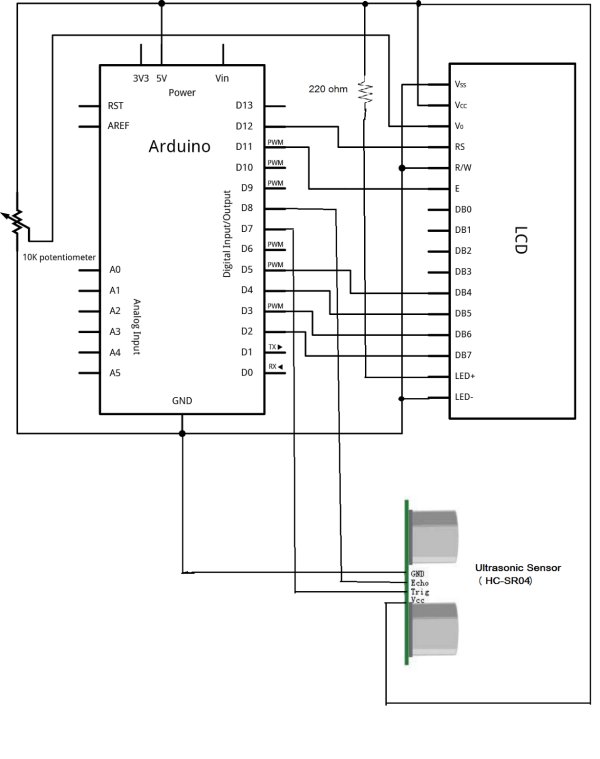
Components Used:
(1) Arduino Nano (Arduino UNO will also work)
(2) Ultrasonic sensor (HC-SR04)
(3) Liquid Crystal Display (16 x 2)
(4) One 220 ohm resistor
(5) One potentiometer
(6) Breadboard and Wires
For more detail: Make an Ultrasonic Distance Calculator
- What components are required for the Arduino Distance Calculator?
The project uses an Arduino Nano (or UNO), HC-SR04 ultrasonic sensor, 16x2 LCD, one 220 ohm resistor, one potentiometer, and a breadboard with wires. - How does the ultrasonic sensor measure distance?
The ultrasonic sensor measures the time it takes for an echo to bounce back after hitting the target and the project converts that time into distance using the speed of sound. - Can I use an Arduino UNO instead of an Arduino Nano?
Yes, the article states Arduino UNO will also work. - Does the project display the measured distance?
Yes, the measured distance is shown on the 16x2 LCD display. - Is the coding for this project complex?
No, the coding was simple and largely adapted from existing Arduino projects with minor modifications. - What is the role of the potentiometer in this project?
The article lists a potentiometer as a component but does not detail its role beyond being part of the circuit. - What resistor value is used in the circuit?
The project uses one 220 ohm resistor. - Where can I find more detailed instructions for this project?
The article references a link titled Make an Ultrasonic Distance Calculator for more detail.
