
Summary of Online Thermometer using Arduino
This article updates the "Online Thermometer" project from Practical Arduino. It addresses issues with older ENC28J60-based shields by recommending the Freetronics Ethernet shield, which uses the superior W5100 chipset and includes a built-in prototyping area. The updated design ensures full compatibility with official Arduino code while simplifying assembly by eliminating the need for a separate prototyping shield.
Parts used in the Online Thermometer:
- Freetronics TwentyTen, Arduino Duemilanove or Uno
- Freetronics Ethernet shield OR official Ethernet shield + prototyping shield
- DS18B20 Dallas 1-wire temperature sensors
- 4K7 resistors
- PCB-mount 3-pin male connectors
- Line-mount 3-pin female connectors
- Twisted pair cable or alarm cable
One of the projects in Practical Arduino is the “Online Thermometer”, which combines an Ethernet shield with a number of DS18B20 1-wire temperature sensors to allow you to read multiple temperatures and make the values accessible using a web browser. In that project I chose a specific model of Ethernet shield that was available at the time from Seeed Studio, mainly because the Seeed guys were clever enough to include some prototyping area on the Ethernet shield and save the hassle of mounting a separate prototyping shield on top.
But there were two problems. Firstly, that particular model of Ethernet shield used the ENC28J60, which is a different chipset to the Wiznet W5100 used in the official Arduino Ethernet shield and as a result it has very poor driver support in Arduino. Working with any of the ENC28J60-based unofficial Ethernet shields is a royal pain in the butt because so much of the internals of TCP/IP have to be implemented directly inside your sketch. It’s complicated, confusing, error prone, and ugly. So that’s bad.
Secondly, that Ethernet shield is now out of production. To use the example code from that project you have to find an alternative Ethernet shield based on the ENC28J60 (yuck!) and then stick a prototyping shield on top. Double bad.
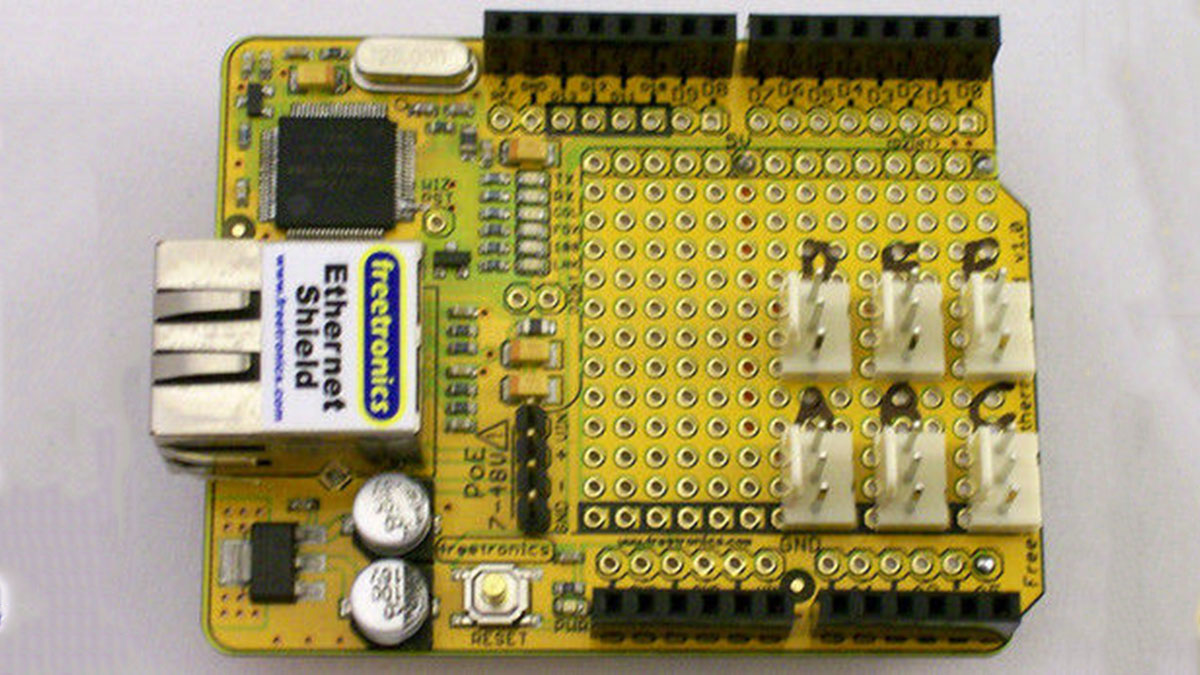
Of course Freetronics didn’t exist when the book came out, and the lessons learned from that and other projects are what guided the design of our Ethernet shield with PoE support. We used the W5100 chipset so it would be 100% compatible with the official shield and example programs, and we incorporated a huge prototyping area inspired by the early Seeed shield. Best of both worlds.
So now I present to you the Online Thermometer, updated. For maximum convenience it can be built on the Freetronics Ethernet shield using its built-in prototyping area, but it will also work just fine with the official Arduino Ethernet shield combined with a prototyping shield.
Major Components in Project
1 x Freetronics TwentyTen, Arduino Duemilanove or Uno, or equivalent
1 x Freetronics Ethernet shield OR 1 x official Ethernet shield + 1 x prototyping shield
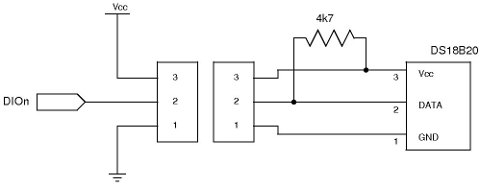
6 x DS18B20 Dallas 1-wire temperature sensors (note: not DS18S20)
6 x 4K7 resistors (1%: yellow-violet-brown-brown, 5%: yellow-violet-red-gold)
6 x PCB-mount 3-pin male connectors
6 x Line-mount 3-pin female connectors
Twisted pair cable or alarm cable (minimum 3 conductors)
For more detail: Online Thermometer using Arduino
- What problem did the original Seeed Studio Ethernet shield have?
The original shield used the ENC28J60 chipset, which has poor driver support in Arduino and requires complex TCP/IP implementation directly in the sketch. - Can I use the official Arduino Ethernet shield for this project?
Yes, but you must combine it with a separate prototyping shield because it lacks the built-in area found on the Freetronics version. - Which temperature sensor model is required for this project?
You must use DS18B20 Dallas 1-wire temperature sensors; the DS18S20 model is not compatible. - Why was the Freetronics Ethernet shield chosen for the update?
It uses the W5100 chipset for 100% compatibility with official shields and example programs while including a large prototyping area. - How many resistors are needed for the setup?
Six 4K7 resistors are required for the six temperature sensors in the project. - Does the updated project require finding discontinued parts?
No, the updated guide recommends using the Freetronics shield so users do not need to hunt for out-of-production ENC28J60 boards. - What type of cabling is recommended for connecting sensors?
A twisted pair cable or alarm cable with a minimum of three conductors should be used.
