
Summary of Call and Message using Arduino and GSM Module
This article describes building a simple mobile phone using an Arduino Uno and SIM900 GSM module. The project enables calling, answering calls, sending/receiving SMS, and voice communication via a microphone and speaker. A 4x4 keypad handles input for numbers and text, while a 16x2 LCD displays messages and alerts. The system demonstrates full GSM interfacing with Arduino for basic telephony functions.
Parts used in the Simple Mobile Phone:
- Arduino Uno
- GSM Module SIM900
- 16x2 LCD
- 4x4 Keypad
- Breadboard or PCB
- Connecting jumper wire
- Power supply
- Speaker
- MIC
- SIM Card
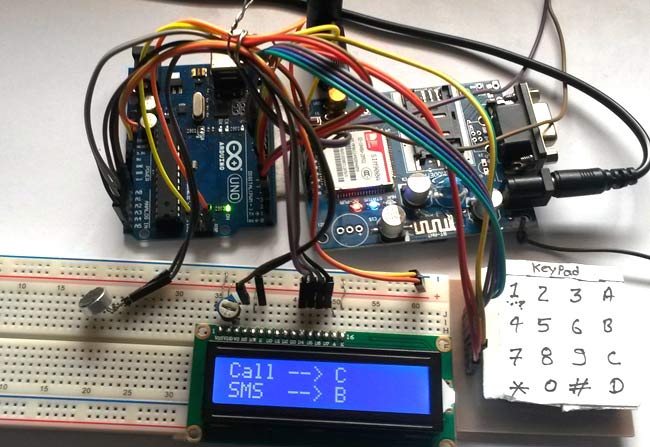
Sometimes people find it difficult to use the GSM Module for its basic functions like calling, texting etc., specifically with the Microcontrollers. So here we are going to build a Simple Mobile Phone using Arduino, in which GSM Module is used to Make the Call, answer the Call, send SMS, and read SMS, and also this Arduino phone has Mic and Speaker to talk over this Phone. This project will also serve as a proper interfacing of GSM Module with Arduino, with all the Code needed to operate any Phone’s basic functions.
Components Required:
- Arduino Uno
- GSM Module SIM900
- 16×2 LCD
- 4×4 Keypad
- Breadboard or PCB
- Connecting jumper wire
- Power supply
- Speaker
- MIC
- SIM Card
Working Explanation:
In this Arduino Mobile Phone Project, we have used Arduino Uno to control whole system’s features and interfacing all the components in this system. A 4×4 Alphanumeric Keypad is used for taking all kind of inputs like: Enter mobile number, type messages, make a call, receive a call, send SMS, read SMS etc. GSM Module is used to communicate with the network for calling and messaging purpose. We have also interfaced a MIC and a Speaker for Voice Call and Ring sound and a 16×2 LCD is used for showing messages, instructions and alerts.
Alphanumeric is a method to enter numbers and alphabets both by using same keypad. In this method, we have interfaced 4×4 keypad with Arduino and written Code for accepting alphabets too, check the Code in Code section below.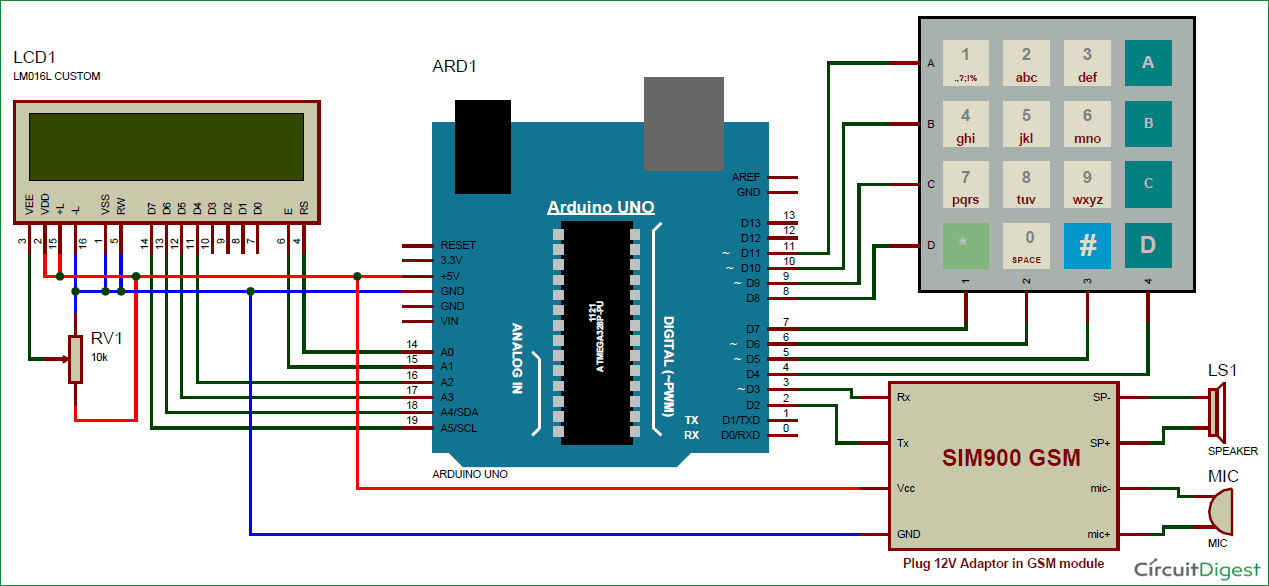
Read More: Call and Message using Arduino and GSM Module
- What basic functions can this Arduino phone perform?
The phone can make calls, answer calls, send SMS, read SMS, and support voice calls. - How is input handled in this project?
A 4x4 Alphanumeric Keypad is used to enter mobile numbers, type messages, and manage call functions. - Which microcontroller controls the system?
The Arduino Uno controls all features and interfaces all components in the system. - What component is used for voice communication?
A MIC and Speaker are interfaced for voice calls and ring sounds. - How does the system display information?
A 16x2 LCD is used for showing messages, instructions, and alerts. - Can the keypad accept alphabets as well as numbers?
Yes, the 4x4 keypad accepts both alphabets and numbers using an alphanumeric method. - What module communicates with the network?
The GSM Module is used to communicate with the network for calling and messaging purposes. - Is code provided for this project?
Yes, the article mentions that all necessary code to operate the phone's basic functions is included.
