
Summary of Quizmo
This article describes "Quizmo," a handheld gadget designed to help children practice arithmetic, specifically multiplication tables. The device uses an Arduino UNO to randomly generate questions and evaluates answers via a 4x3 keypad, displaying results on an LCD screen. Users can adjust brightness with a potentiometer or fixed resistors, select quiz types from a menu, submit answers with the * key, and restart with the # key. The difficulty level is customizable by modifying the random number generator's range in the code.
Parts used in Quizmo:
- Arduino UNO
- 4x3 Keypad
- LCD Screen
- Potentiometer (Resistor)
- Fixed Resistors (Optional)
- Wires for connectivity
This project is related to developing a handy gadget to help kids practice basic arithmetic operations. I decided to make it as my kids were very lazy to look into the books and come back very soon saying that they have done it (specially multiplication tables). This gadget randomly asks different questions and evaluate kids performance.
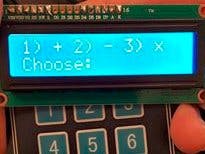
For this you need a 4×3 keypad to interact with the gadget and an LCD to show you results. for connectivity of LCD with arduino, you can follow instructions on below path:
http://www.instructables.com/id/Connecting-an-LCD-to-the-Arduino/
Once you have setup brightness using the rehestat, you can note down the values and replace it with fixed resistors or keep it there if you want the user to adjust brightness as per his/her comfort.
In order to connect keypad with arduino, use guide on this link:
http://www.instructables.com/id/interface-keypad-with-arduino/
Power up Arduino and it will ask you what kind of quiz you want to take. Selec appropriate option and it will start. Once you have input your answer, you need to press * in order to submit and let the gadeget check your answer. In order to finish the quiz or take next one, press # and main menu will appear again. You can increase the difficulty level from the code by changing the maximum range of random number generator. This gadget currently produces random questions by using numbers from 1 to 12.
Schematics
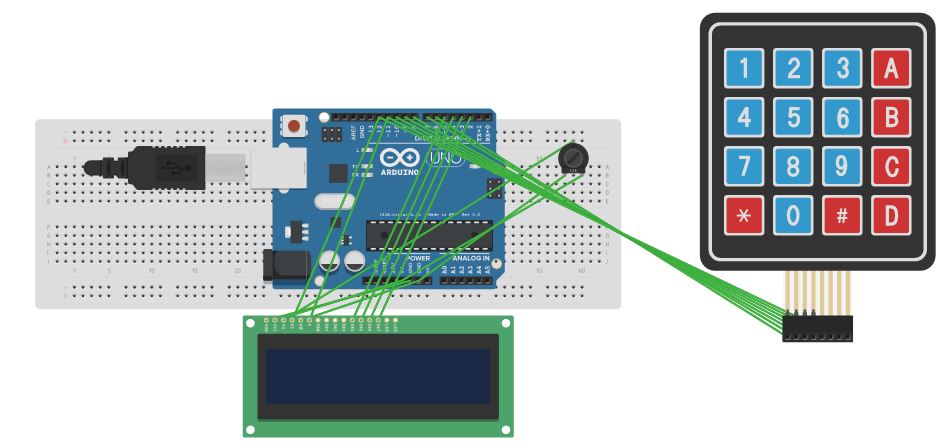
This is how whole system must look like
Code
Upload this code directly to UNO and make sure you use the wiring similar to mentioned in code
Read More: Quizmo
- How does the gadget evaluate a child's performance?
The gadget randomly asks different questions and evaluates the kids' performance after they submit their answer. - What components are required to build this project?
You need an Arduino UNO, a 4x3 keypad, an LCD screen, and a potentiometer or fixed resistors for brightness control. - How do you submit an answer on the device?
After inputting your answer, you need to press the * key to submit it so the gadget can check the result. - Can you adjust the brightness of the LCD display?
Yes, you can setup brightness using a potentiometer or replace it with fixed resistors once values are noted. - How do you access the main menu again during a quiz?
To finish the current quiz or take a new one, press the # key and the main menu will appear again. - How can the difficulty level of the quiz be increased?
You can increase the difficulty level from the code by changing the maximum range of the random number generator. - What range of numbers does the gadget currently use for questions?
This gadget currently produces random questions by using numbers from 1 to 12.
