
Summary of Three level Ultra security system using Arduino
This article introduces the "Ultra Security System," a three-level protection project using Arduino to detect robbery attempts. The first level utilizes an LDR and laser setup; if light deviation occurs in a bank locker, the system triggers a GSM module to send an alert message.
Parts used in Ultra Security System:
- LDR
- Arduino
- GSM Module
- NPN Transistors BC 547
- Diodes (1N 4007)
- Red LED
- Capacitors (1 uF)
- Voltage Regulator(7805)
- Resistors
- Batteries (9V)
Today we are in a world where robbery has increased to a great extent. Hence there is a need to protect everything using a security system. Here is a small project on security system called ULTRA SECURITY SYSTEM which will be very useful.
This system is three way protected and consists of three sensors which will alert the user in case if any attempt to breach occurs. For simplification i have explained the three parts of this Ultra security system individually. Let’s see what is that three level security.
LDR AND LASER LEVEL IN ULTRA SECURITY SYSTEM:
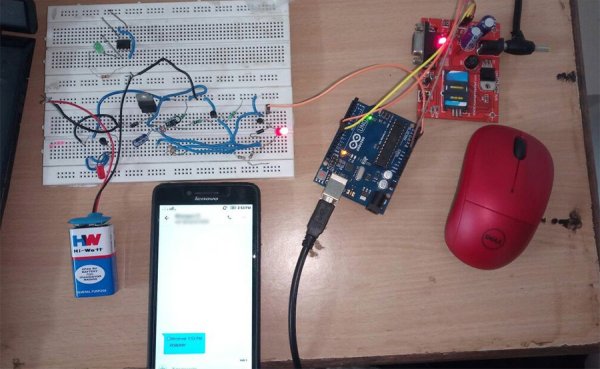
This is the first level of detecting the robbery in BANK. LDR sensor is placed inside the locker the laser is focused on the door of the locker, When the robber tries to open the BANK cell the LDR in locker is light deviates and then the Arduino commands the GSM module then this sends a text message “ROBBERY” to the registered mobile number or the nearest police station.
1.1) COMPONENTS USED:
- LDR
- ARDUINO
- GSM Module
- NPN Transistors BC 547
- Diodes (1N 4007)
- Red LED
- Capacitors (1 uF)
- Voltage Regulator(7805)
- Resistors
- Batteries (9V)
SCHEMATIC CIRCUIT:
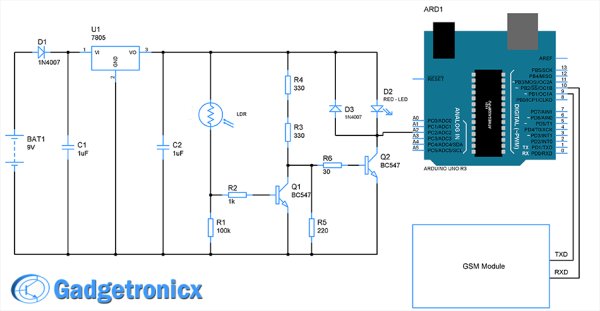
CODE:
- #include <SoftwareSerial.h>
- SoftwareSerial mySerial(9,10); //(tx,rx) aurdino
- float a=A2;
- int b,c;
- void setup()
- {
- mySerial.begin(9600); // Setting the baud rate of GSM Module
- Serial.begin(9600); // Setting the baud rate of Serial Monitor
- delay(100);
- }
- void loop()
- {
- b=analogRead(a);
- c=map(b,0,1023,0,10);
- Serial.print(c);
- Serial.print(“/”);
- delay(1000);
- if(c<3)
- {
- mySerial.println(“AT+CMGF=1”); //Sets the GSM Module in Text Mode
- delay(1000); // Delay of 1000 milli seconds or 1 second
- mySerial.println(“AT+CMGS=\”+918500911427\”\r”);
- delay(1000);
- Serial.print(“ROBERRY”);
- mySerial.println(“ROBERRY”);
- delay(100);
- mySerial.println((char)26);// ASCII code of CTRL+Z
- delay(1000);
- }
- }
- What is the purpose of the Ultra Security System?
It is a three-way protected security system designed to alert users if any attempt to breach occurs. - How does the first level of detection work?
The LDR sensor inside the locker detects when the laser focused on the door deviates as a robber tries to open it. - What action does the Arduino take upon detecting a breach?
The Arduino commands the GSM module to send a text message labeled ROBBERY to a registered mobile number or police station. - Which components are required for this project?
Components include an LDR, Arduino, GSM Module, NPN Transistors BC 547, Diodes, Red LED, Capacitors, Voltage Regulator, Resistors, and Batteries. - Can this system be used in a bank setting?
Yes, the article explains that this first level of detection is specifically placed inside a locker within a BANK cell. - What happens when the sensor reading drops below a certain threshold?
If the mapped value c is less than 3, the code sends AT commands to the GSM module to transmit an alert message. - Does the system use a specific programming language?
The project uses C++ code with the SoftwareSerial library to manage communication between the Arduino and the GSM module. - How is the voltage regulated in the circuit?
A Voltage Regulator(7805) is listed among the components used to regulate power for the system.
