
Summary of Voice controlled home automation using Arduino
This article outlines a DIY voice-controlled home automation project using an Arduino and Bluetooth. It enables users to control appliances like lights, fans, doors, and TVs via voice commands through a smartphone app. The system is designed to assist the elderly and disabled by providing hands-free access to hard-to-reach areas and optimizing energy usage.
Parts used in the Voice controlled home automation:
- Arduino
- Motor driver (L293D)
- DC motor (fan)
- LED (for TV simulation)
- Relay (12v)
- Bulb (7w)
- Bluetooth module (HC-05)
- Smart phone
- Servo motor (for door)
Ever thought of controlling your home using voice. If you are the one who fascinated it as I do, this project might help you do it for real. Voice powered products are already taking over the market and this voice controlled home project will enable you you to build one for your own.
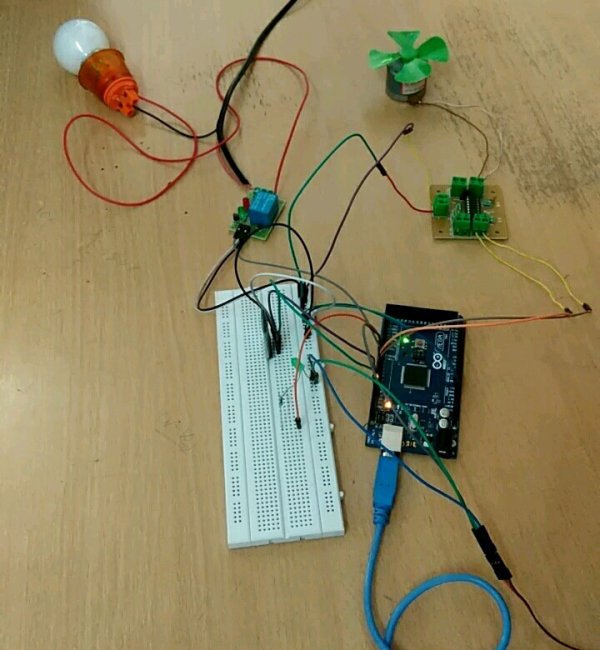
We have developed a prototype of this “Voice controlled home automation” project and we are going to share the steps to build it. We are pretty sure that this will help elderly and disabled in home also it will give control of places with difficult reach.
APPLICATIONS:
- Turning appliances ON/OFF with minimal effort.
- Lawn irrigation systems
- Heat, ventilation and air conditioning control
- Optimizing use of low cost electricity.
HARDWARE REQUIREMENTS:
- Arduino
- Motor driver & DC motor (fan)
- Led ( Simulation of TV)
- Relay (12v) bulb ( 7w )
- Bluetooth module (hc-05)
- Smart phone
- Servo (door)
SOFTWARE REQUIREMENTS:
- AMR Voice app
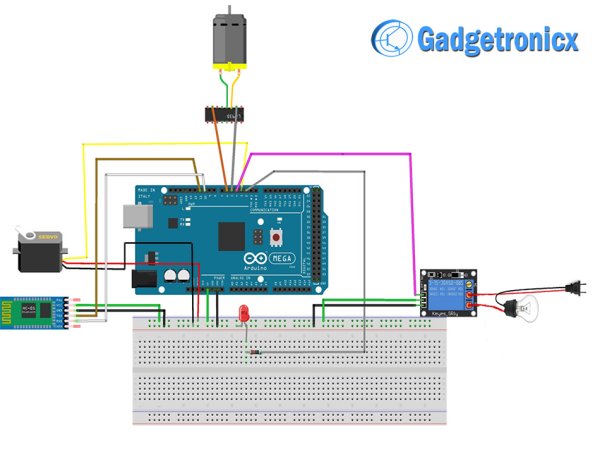
SCHEMATIC DIAGRAM OF VOICE CONTROLLED HOME AUTOMATION:
AMR VOICE APP:
This Application is an important constituent for this project. This app uses your internal Voice recognition in your smartphone to send the data serially to the Bluetooth connected to your Arduino. This application data takes special data format
- * – Start bit of the data
- # – Stop bit of the data.
We need to incorporate these start and stop bits in our code. For example if we give “ON” voice command by speaking through this app, it will reach the Arduino as “*ON#“. You can download this Android app in Playstore. Sorry this Application is not available in iOS platforms and i couldn’t find any alternatives as well.
WORKING EXPLANATION:
As you can see in the schematic i have add four activators
- Relay board – For activating the bulb
- DC motor with L293D – Fan
- Servo motor – Closing and opening of door
- LED – TV control ( Demonstrative purpose)
The communication between Bluetooth module is established using android phone and AMR voice app. Initially turn on the Bluetooth in your phone, pair and connect with module HC-05. You will be all set give your voice commands to your phone which in turn sends it to BT module and it forwards to Arduino in serial data representation.
Read More: Voice controlled home automation using Arduino
- What components are required for the hardware?
The project requires an Arduino, motor driver, DC motor, LED, 12v relay, 7w bulb, HC-05 Bluetooth module, smart phone, and servo motor. - How does the AMR Voice app function?
The app uses internal voice recognition on the smartphone to send data serially to the Bluetooth-connected Arduino with specific start and stop bits. - Can I use this project on an iOS device?
No, the AMR Voice Application is not available on iOS platforms and no alternatives were found by the author. - What is the data format sent from the app to the Arduino?
The data uses a star symbol as the start bit and a hash symbol as the stop bit, such as *ON# for an ON command. - Which four activators are included in the schematic?
The schematic includes a relay board for the bulb, a DC motor with L293D for the fan, a servo motor for the door, and an LED for TV control. - How is communication established between the phone and Arduino?
Communication is established by pairing the Android phone's Bluetooth with the HC-05 module and sending voice commands via the app. - What software is needed to run this project?
The only required software mentioned is the AMR Voice app. - Who can benefit most from this voice-controlled system?
The project is designed to help the elderly and disabled by allowing control of places with difficult reach.
