
Summary of Arduino GPS Clock usign arduino
The author repurposes a Holux M-1000B Bluetooth GPS module for an Arduino project to avoid buying expensive shields. By connecting the receiver via Bluetooth, the device streams NMEA V3.01 data at 38400 baud to a PC or Arduino. The article demonstrates how to pipe this serial output directly into the Arduino for parsing, noting that NMEA is an ASCII-based protocol making software implementation straightforward.
Parts used in the Arduino GPS Clock:
- Holux M-1000B Bluetooth GPS module
- Arduino board
- Bluetooth SPP connection (virtual USB COM port)
- PC with Linux operating system
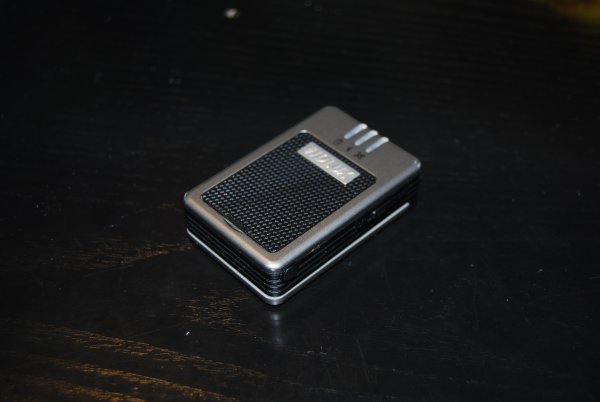
I had a Holux M-1000B Bluetooth GPS module that was just gathering dust in my room. I had bought it from DealExtreme back in the days when I had GPS-less (but external GPS capable) Nokia E51. Upgrading to a Nokia E52 has since made this receiver redundant. However, since getting an Arduino, and being put off by the price of GPS shields for them, I decided to use the GPS receiver I already have.
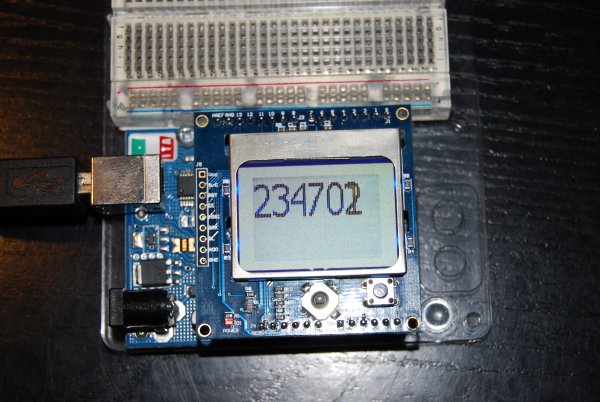 Once the receiver is connected to satellites, the device just spews GPS NMEA V3.01 data at you via Bluetooth SPP or a virtual USB COM port on the PC. Building Arduino projects are a bit like playing with Lego as a child – You spend hours rooting through the big box for one part (only in the case of Arduinos, it’s the delivery of parts from electronics suppliers) and when you get it, you can finally finish it. The project sits on your desk for about 1 day to be admired, and then it gets dissembled, never to be rebuild (well, unless it’s really good).
Despite opening the board up and finding the appropriate points to probe it was easier just to leave the GPS on the window ledge, and connect it to the PC via bluetooth. I could then pipe the output from the GPS serial port to the Arduino serial port. The settings for the GPS COM port are 38400 baud 8,N,1 if you want to look at what the device is sending out. Because NMEA is an ASCII based protocol, parsing programs are trivial to write. Below is a sample Linux command and some sample NMEA output sentences:
 user@host:~$ cat /dev/rfcomm1 $GPRMC,152926,V,6027.8259,N,02225.6713,E,10.8,0.0,190803,5.9,E,S*22 $GPRMB,V,,,,,,,,,,,,A,S*0E $GPGGA,152926,6027.8259,N,02225.6713,E,8,09,2.0,44.7,M,20.6,M,,*79 $GPGSA,A,3,07,08,09,11,18,23,26,28,29,,,,6.6,2.0,3.0*38 $GPGSV,3,1,09,07,29,138,44,08,22,099,42,09,30,273,44,11,07,057,35*75 $GPGSV,3,2,09,18,28,305,43,23,14,340,39,26,64,222,49,28,60,084,49*7E $GPGSV,3,3,09,29,52,187,48*4E $GPGLL,6027.8259,N,02225.6713,E,152926,V,S*48 $GPBOD,,T,,M,,*47 $PGRME,15.0,M,22.5,M,15.0,M*1B $PGRMZ,147,f,3*19 $GPRTE,1,1,c,*37 $GPRMC,152928,V,6027.8319,N,02225.6713,E,10.8,0.0,190803,5.9,E,S*29
For more detail: Arduino GPS Clock
-
How can I connect a Holux M-1000B to an Arduino?
You can connect it via Bluetooth SPP or a virtual USB COM port on the PC and pipe the output to the Arduino serial port. -
What are the settings for the GPS COM port?
The settings for the GPS COM port are 38400 baud 8,N,1. -
Does the GPS module send data in binary or text format?
The device sends NMEA V3.01 data which is an ASCII based protocol. -
Why did the author choose to use the existing GPS receiver?
The author decided to use the existing receiver because they were put off by the price of GPS shields for Arduinos. -
Can I parse the GPS data easily?
Yes, because NMEA is an ASCII based protocol, parsing programs are trivial to write. -
What command was used to view the GPS output in the example?
The sample Linux command used was cat /dev/rfcomm1. -
What type of data sentences does the GPS module output?
The module outputs various NMEA sentences such as GPRMC, GPGGA, GPGSA, GPGSV, GPGLL, and PGRME.
