
Summary of 2-Player Pong Game with Arduino Uno
This article describes a 2-player Pong game built on an Arduino Uno featuring a Nokia 5110 (PCD8544) LCD screen. Each player controls their paddle using a dedicated potentiometer, rotating it to move the bar left or right. The project requires connecting the hardware components as per the provided diagram and uploading the specific Arduino sketch to run the game.
Parts used in the 2-Player Pong Game:
- Arduino Uno
- PCD8544 LCD screen (Nokia 5110)
- 2 potentiometers
Classical Pong game implemented on an Arduino Uno using a PCD8544 LCD screen which is better known as the Nokia 5110 screen.
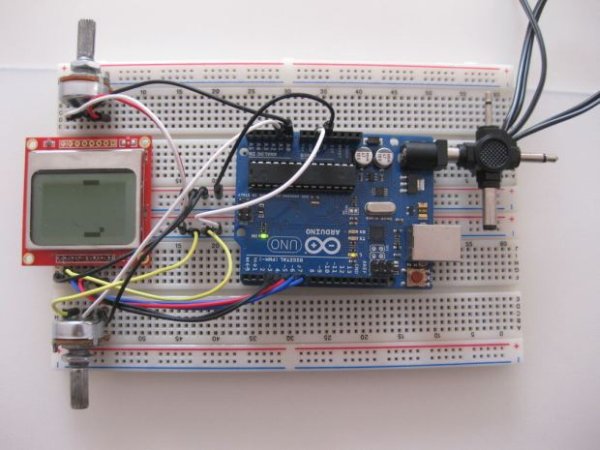
Player bars are controlled by a potentiometer for each player. If you want the bar to go left, just turn the potentiometer left.
Step #1:
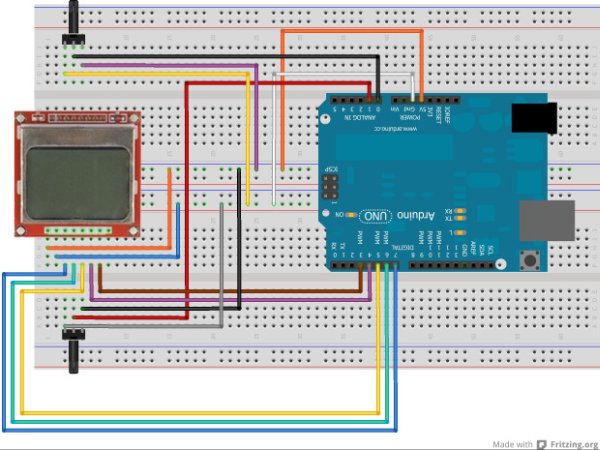
- Connect the Arduino Uno, PCD8544 LCD screen and 2 potentiomaters as shown in the Fritzing diagram.
Step #2:
- Download Arduino software from http://arduino.cc/en/Main/Software
Step #3:
Download the Arduino sketch (Pong.ino file) from https://github.com/monur/Arduino-Uno-PCD…
For more detail: 2-Player Pong Game with Arduino Uno
- How are player bars controlled?
Player bars are controlled by a potentiometer for each player. - What happens if you turn the potentiometer left?
If you turn the potentiometer left, the bar will go left. - Where can I download the Arduino software?
You can download the Arduino software from http://arduino.cc/en/Main/Software. - Which file contains the code for this project?
The Arduino sketch is named Pong.ino. - Where is the Pong.ino file located?
The Pong.ino file is available at https://github.com/monur/Arduino-Uno-PCD... - What type of screen is used for the display?
A PCD8544 LCD screen, also known as the Nokia 5110 screen, is used. - How many potentiometers are required for the circuit?
Two potentiometers are required, one for each player. - Can this game be played with two people?
Yes, it is designed as a 2-Player Pong Game. - What should I do after connecting the components?
You should download and upload the Arduino sketch to the board.
