
Summary of Project: Cleaner robot using Magician Chassis, Arduino, distance sensor and hand sweeper
This article describes a DIY cleaner robot built with an Arduino UNO R3 and Magician Chassis. The robot moves forward while rotating a hand sweeper to clean floors. If the distance sensor detects a wall, it stops, waits briefly, then turns left before resuming movement. The project includes code modifications for a 360-degree sweeping motion and sensor mounting using foam tape.
Parts used in the Cleaner robot:
- Arduino UNO R3
- Magician Chassis
- Shield Motor Driver (Shield 4Power)
- Distance Sensor
- Servomotor
- Hand Sweeper
- Battery
This is a cleaner robot so you can give to your mommy or just use to clean your bedroom =P.
Material List:
1x Shield Motor Driver (Shield 4Power)
1x Hand Sweeper
1x Battery
 1. How it works
When the robot is on, it moves forward and rotates the hand sweeper (for cleaning). If the sensor detects a wall in front of it, the robot will turn to the left and keeps moving forward.
2. Adaptations
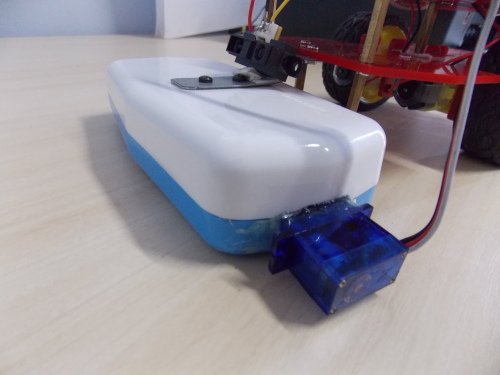
We have done adaptations to the servomotor so it could turn 360º the hand sweeper, as we can see in the pictures below:
To fix the distance sensor we used a tape foam double sided:
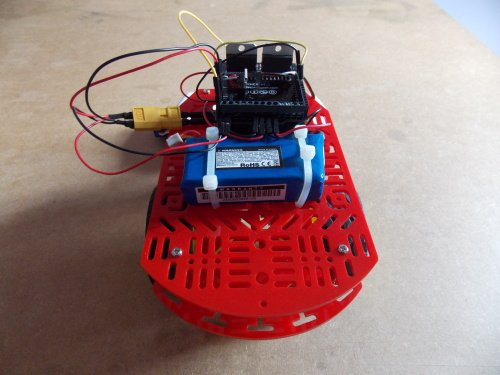
3. Robot Pictures
4. The Sketch
#include <S4power.h>
#include <Servo.h>
S4Power s4power;
Servo limp; //Attach “limp” for use the commands of the servo.h
int count1 = -20; //Speed of the Motor 1 (M3)
int count2 = -30; //Speed of the Motor 2 (M4)
int sensorValue; //Variable for get the distance sensor value
int vass = 9; //Attcha the D9 pin for the variable vass, cause the same will be used for control the servomotor
void setup()
{pinMode(vass, OUTPUT); //Attach the pin D9 (vass) as OUTPUT
s4power.Config(); //Configure the Motor Driver Shield (4Power)
limp.attach(vass); //Link the pin D9 to servomotor
limp.write (-180); //Roll the hand sweeper}
void loop()
{sensorValue = analogRead(A5); //Read the sensor value using the pin A5 and put int the variable.
if (sensorValue > 230) //If the sensor value more than 230(Near the wall), turn the robot.
{s4power.M3.speed = 0; //Stop Motor 1
s4power.M4.speed = 0; //Stop Motor 2
s4power.M3.Update(); //Update Motor 1
s4power.M4.Update(); //Uptade Motor 2
delay(500); //Wait 0,5 seconds
 s4power.M3.speed = -40; //Motor 1 move forward
s4power.M4.speed = 40; //Motor 2 move backward
s4power.M3.Update(); //Update Motor 1
s4power.M4.Update(); //Update Motor 2
delay(500); //Turn for 0,5 seconds}
else
{s4power.M3.speed = count1; //Motor 1 move forward
s4power.M4.speed = count2; //Motor 2 move forward
s4power.M3.Update(); //Update Motor 1
s4power.M4.Update(); //Update Motor 2}}
For more detail: Project: Cleaner robot using Magician Chassis, Arduino, distance sensor and hand sweeper
- How does the robot move when it encounters a wall?
The robot stops both motors, waits 0.5 seconds, then turns left by moving one motor forward and the other backward. - What component is used to detect walls?
A distance sensor connected to pin A5 reads values to determine proximity to obstacles. - Can the hand sweeper rotate fully?
Yes, adaptations were made to the servomotor to allow it to turn 360 degrees. - Which pins are assigned for the servomotor control?
Pin D9 is attached to the variable vass to control the servomotor. - How is the distance sensor mounted on the robot?
Double-sided foam tape was used to fix the distance sensor in place. - What happens if the sensor value is greater than 230?
The robot stops its current movement to avoid collision and initiates a turning maneuver. - How are the motors configured in the setup phase?
The motor driver shield is configured, and the servomotor is linked to pin D9. - What library is included to manage the motor driver?
The S4power library is included to handle commands for the Shield 4Power motor driver.
