
Summary of DIY ADJUSTABLE CONSTANT LOAD (CURRENT & POWER)
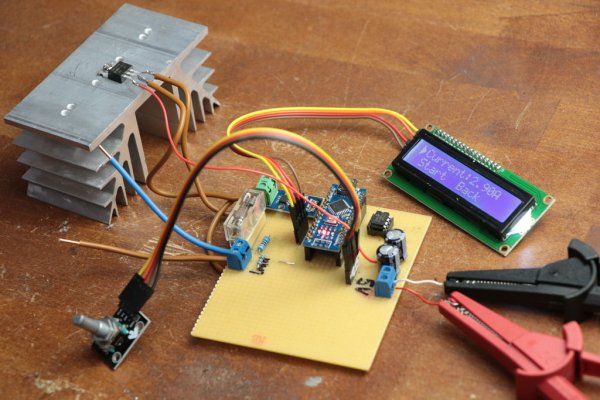
This project builds an adjustable constant load using an Arduino Nano, current sensor, LCD, rotary encoder, MOSFET driver, MOSFET, and supporting components. It supports constant-current and constant-power modes and can handle up to 30 V and 20 A depending on heatsink capability. The guide includes video, parts sources, schematic and wiring photos, and Arduino code for uploading to the Nano.
Parts used in the Adjustable Constant Load:
- Arduino Nano
- 16x2 I2C LCD
- Rotary Encoder
- TC4420 MOSFET Driver
- IRFZ44N MOSFET
- ACS712 Current Sensor
- Fuse Holder
- 20A Fuse
- Binding Post (x2)
In this project I will show you how I combined an Arduino Nano, a current sensor, an LCD, a rotary encoder and a couple of other complementary components in order to create an adjustable constant load. It features a constant current and power mode and can handle a maximum of 30V and 20A if your heatsink design can handle it. Let’s get started!
Step 1: Watch the Video!
The video gives you all the information you need to make your own adjustable constant load. During the next steps though, I will present you some additional information.
Step 2: Order the Components!
Here you can find a parts list with example seller:
Amazon.com:
1x Arduino Nano: https://amzn.to/2PzA0ue
1x 16×2 I2C LCD: https://amzn.to/2o9Ms7N
1x Rotary Encoder: https://amzn.to/2wdvDNH
1x TC4420 MOSFET Driver: https://amzn.to/2PCV8Qf
1x IRFZ44N MOSFET: https://amzn.to/2P7NJYp
1x ACS712 Current Sensor: https://amzn.to/2BLBxL5
1x Fuse Holder: https://amzn.to/2BSGtxw
1x 20A Fuse: https://amzn.to/2MRbeax
2x Binding Post: https://amzn.to/2MN8Q4L
Ebay:
1x Arduino Nano: http://rover.ebay.com/rover/1/711-53200-19255-0/1?…
1x 16×2 I2C LCD: http://rover.ebay.com/rover/1/711-53200-19255-0/1?…
1x Rotary Encoder: http://rover.ebay.com/rover/1/711-53200-19255-0/1?…
1x TC4420 MOSFET Driver: http://rover.ebay.com/rover/1/711-53200-19255-0/1?…
1x IRFZ44N MOSFET: http://rover.ebay.com/rover/1/711-53200-19255-0/1?…
1x ACS712 Current Sensor: http://rover.ebay.com/rover/1/711-53200-19255-0/1?…
1x Fuse Holder: http://rover.ebay.com/rover/1/711-53200-19255-0/1?…
1x 20A Fuse: http://rover.ebay.com/rover/1/711-53200-19255-0/1?…
2x Binding Post: http://rover.ebay.com/rover/1/711-53200-19255-0/1?…
Amazon.de:
1x Arduino Nano: https://amzn.to/2BLw2Ml
1x 16×2 I2C LCD: https://amzn.to/2BJ8tnx
1x Rotary Encoder: https://amzn.to/2Lmt5S0
1x TC4420 MOSFET Driver: https://amzn.to/2PBVQ0g
1x IRFZ44N MOSFET: https://amzn.to/2PxQd38
1x ACS712 Current Sensor: https://amzn.to/2NijkGn
1x Fuse Holder: https://amzn.to/2NkffkK
1x 20A Fuse: https://amzn.to/2PCLm0A
2x Binding Post: https://amzn.to/2BP0eGq
Step 3: Create the Circuit!
Here you can find the schematic as well as pictures of my finished circuit. Feel free to use it as a reference for your own circuit.
Step 4: Upload the Code!
Here you can download the code for the project. Upload it to the Arduino Nano through the Arduino IDE
Read more: DIY ADJUSTABLE CONSTANT LOAD (CURRENT & POWER)
- What is the maximum voltage and current this adjustable constant load can handle?
The project can handle a maximum of 30V and 20A if your heatsink design can handle it. - Which microcontroller is used in this project?
The project uses an Arduino Nano. - What display is used to show information?
A 16x2 I2C LCD is used for display. - How is current measured in the circuit?
Current is measured using an ACS712 current sensor. - Which MOSFET and driver are recommended?
The guide uses an IRFZ44N MOSFET and a TC4420 MOSFET driver. - How do you adjust the load settings?
Settings are adjusted using a rotary encoder. - Is code provided for the Arduino?
Yes, the project provides code to download and upload to the Arduino Nano via the Arduino IDE. - Are schematics and photos available to build the circuit?
Yes, the guide includes the schematic and pictures of the finished circuit for reference. - Are fuses included in the recommended parts?
Yes, a fuse holder and a 20A fuse are listed in the parts.
