
Summary of Designing and building a coffee table
This article details the transformation of a vintage IBM 4381 mainframe CPU (1983) into a coffee table. The project utilizes DesignSpark Mechanical (DSM) software for CAD design, starting with hand sketches and importing precise 3D models from the RS catalogue. The build focuses on creating a sturdy frame to support the heavy 20-30kg CPU while featuring a glass top to showcase the intricate internal hardware.
Parts used in the IBM Mainframe Coffee Table:
- IBM 4381 mainframe CPU
- Rexroth aluminium extrusion (30 Series)
- Glass top
- Threaded mounting holes (on CPU body)
For a number of years, my colleague Andrew has had an old IBM mainframe CPU kept in storage, waiting to be transformed into something new. Hailing from a long-lost era of computing (the system in which this module was used was the 4381, first announced in 1983) – this is a far cry from what we might think of as a CPU today. It weighs approximately 20-30kg, and measures around 700mm x 650mm x 130mm!
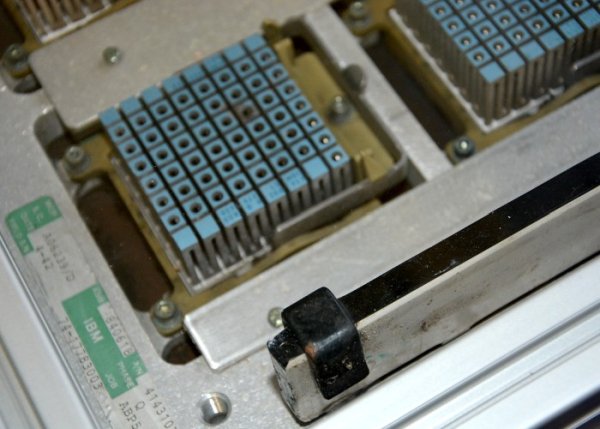
With such size and mass, we decided that this CPU would make a great basis for a coffee table, with a glass top showing off the pleasant, intricate details of the hardware. In this post we will use DesignSpark Mechanical (herein referred to as DSM) – a free to use, powerful CAD software from RS – to design the table, before going on to build the table.
Planning the build
From the start, I planned to use Rexroth aluminium extrusion for the frame of the coffee table. Available in a variety of sizes, it is used for all sorts of projects, from desktop 3D printers and CNC mills, to partition walls and display stands.
Sitting down with a pad of paper and pen, I sketched out a few rough ideas for the structure of the frame. I find this a great way to start the conceptual phase before reaching for a computer.
Once I had a rough sketch on paper, I measured the CPU, with the intention of drawing a simplified 3D model of it, including any important features. For example, there are already threaded mounting holes on the body of the CPU, which I will make use of to affix it to the aluminium frame.
When it came to selecting the Rexroth profile, I settled upon the ‘30 Series’ profile: 30mm x 30mm cross section with 8mm slots. According to the manufacturer, suitable applications for this size profile include ‘medium-stress construction’, partitions and shelves. I had also considered the smaller ‘20 Series’ profile with 20 x 20mm section, but in the end felt that wouldn’t be quite up to the job.
Besides, we wouldn’t want to risk spilling our hot beverages should the smaller extrusion fail!
More sketching in DSM
One of the handy aspects of DSM is the ability to import models directly from the RS catalogue, saving time in modelling the parts from scratch. Navigating to the product page for the extrusion, I was able to download the 3D model and import it into my design, alongside the simplified CPU model.
Read More: Designing and building a coffee table
- What is the origin of the CPU used in this project?
The CPU hails from the 4381 system first announced in 1983. - How much does the CPU weigh?
The CPU weighs approximately 20 to 30 kilograms. - Which software was used to design the table?
DesignSpark Mechanical (DSM), a free CAD software from RS, was used. - Why was the 30 Series profile chosen over the 20 Series?
The 30 Series was selected because the smaller 20 Series might not be up to the job and could risk failure if hot beverages were spilled. - How are the CPU and frame connected?
The CPU is affixed to the aluminium frame using existing threaded mounting holes on its body. - Can users import parts directly into DSM from a catalogue?
Yes, DSM allows users to import models directly from the RS catalogue to save time. - What is the purpose of the glass top?
The glass top is designed to show off the pleasant, intricate details of the hardware inside. - What initial step did the author take before using the computer?
The author sketched out rough ideas for the structure using a pad of paper and pen.
