
Summary of BARC Jeep – An XBOX Controlled Power Wheels
Summary: This project converts a Power Wheels Jeep Hurricane into an Xbox-controller–driven vehicle using an Arduino, USB Host Shield, Pololu motor controllers, and a linear actuator for steering. It includes code, motor controller profiles, and hardware steps to integrate wireless Xbox input, drive motors, and control steering, with room for future sensors and driver profiles.
Parts used in the Power Wheels Jeep Hurricane Project:
- Working 12 Volt Power Wheels with Battery (Power Wheels Jeep Hurricane with Monster Traction)
- Arduino Uno R3
- USB Host Shield (Circuits@Home USB Host Shield 2.0)
- Pololu Simple High-Power Motor Controller 18v25
- Pololu Jrk 12v12 USB Motor Controller with Feedback
- Concentric LACT4P-12V-5 Linear Actuator with Feedback (4" stroke, 12V)
- Microsoft Xbox 360 Wireless Gaming Receiver for Windows
- Xbox 360 Wireless Controller
- 12"x12"x.25" sheet of aluminum
- 4' of shelf track (or similar)
- Assorted nuts and bolts for steering drive connections
- Perfboard for breakout board
- Connection headers
- USB cord for Arduino (to be hacked)
- 3-strand wire for signal and power to actuator
- Various wires for breakout and connections
- Soldering iron and solder
- Wire strippers
- Saw or cutting wheel for metal
- Wrenches and screwdrivers
- Drill (or drill press)
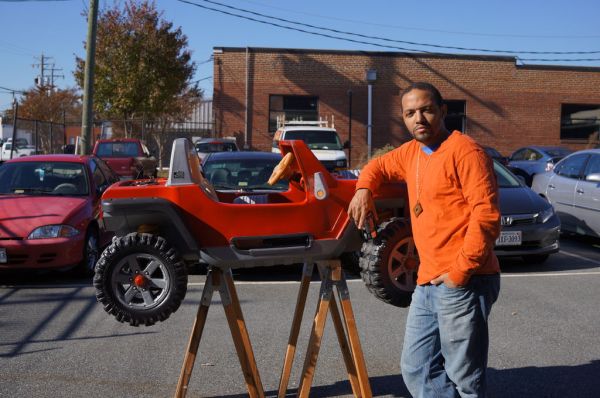
I wanted to do this project so I could drive my kids around. They are 2 and 3. We take the jeep out a few times a week. It’s great for going to the park or just walking around the neighborhood. It works kind of like a stroller as far as containing and protecting them, but obviously way awesomer.
This project has also been built with expansion in mind. Because the motor controller boards have feedback, and there’s plenty of room left on the Arduino microcontroller, it will be easy to add things such as proximity sensors and driver profiles. That way, when I give it to my little boy to drive himself, I can set the driver profile to be gentler as well as activate proximity sensors so he can’t ram a tree.
Also, in essence this entire build is a fairly simple way to get a robot off the ground. My project was particular to the power wheels because I’d been dreaming of sitting on my porch with my controller and driving my kids in the yard, but really the setup could apply to anything with motor driven wheels and a steerable front end. (motor size etc taken into consideration of course).
I hope you enjoy reading about my project as much as I did making it. And if you do decide to tackle this Instructable and build your own, please contact me for any questions. I want to keep improving this so as many people can take that old Power Wheels and make it into the coolest thing on the block.
Now let’ s make it!
Things you will need:
- Working 12 Volt Power Wheels with Battery (check Amazon or Craigslist if you don’t have one)
- Arduino Uno R3
- USB Host Shield
- Pololu Simple High-Power Motor Controller 18v25
- Pololu Jrk 12v12 USB Motor Controller with Feedback
- Concentric LACT4P-12V-5 Linear Actuator with Feedback: 4″ Stroke, 12V, 1.7″/s
- Microsoft Xbox 360™ Wireless Gaming Receiver for Windows®
- Xbox 360 Wireless Controller
- 12″x12″x.25″ sheet of aluminum (available at hardware store)
- 4′ of shelf track (or whatever generic type can be found)
- Assorted nuts and bolts for making steering drive connections
- A piece of perfboard to make the breakout board
- Connection headers
- USB cord that fits Arduino to be hacked
- 3 strand wire for signal and power transmission to actuator
- Various wire bits for jumping on breakout board and other places
Tools / Supplies:
* Soldering Iron (i like this one)
* Solder
* Wire Strippers
* A saw or cutting wheel to cut metal (i used an end grinder with a cutting wheel)
* Wrenches / Screwdrivers
* Drill – (a drill press is good for the steering plates, but a drill will work)
Overview:
- Connect the Arduino to the USB Host shield, then connect that to the Wireless gaming receiver.
- Drive the linear actuator with the Pololu Jrk Motor Controller
- Drive the motors already in the Power Wheels with the Pololu Simple High-Power Motor Controller
- Connect both motor controllers to the Arduino so they are controlled by the Xbox controller.
- Remove the steering mechanism currently in the Power Wheels
- Build a custom steering mechanism that is controlled with the linear actuator.
Sounds easy, right!
Step 1: Get the Xbox Controller Communicating to the Arduino

The first thing is get the Xbox controller communicating with the Arduino via theUSB Host Shield. All of the pics included in this Instructable show an Arduino Mega, but in reality, an Uno is all that is needed for the USB Host Shield and only 2 digital outs.
Plug the USB Host Shield onto the Arduino. For now, power the Arduino with you’re computer. Next plug the Xbox 360™ Wireless Gaming Receiver for Windows®. Once these connections are made load code shown below into the Arduino which allows the Arduino to perform steering operations based on input from the controller.
There’s plenty of notation to help understand what’s going on.
Arduino Code
// * RC Power Wheels Jeep *
// *****************************
/*
OVERVIEW
A 12v dual-motor Power Wheels Jeep Hurricane will have drive
and steering remotely-controlled via Arduino.
HARDWARE
Power Wheels Jeep Hurricane
Arduino UNO R3
Circuits@Home USB Host Shield 2.0 http://www.circuitsathome.com/products-page/arduino-shields/usb-host-shield-2-0-for-arduino
Pololu Simple Motor Controller 18v25 http://www.pololu.com/catalog/product/1381/resources
Pololu JRK Motor Controller 12v12 http://www.pololu.com/catalog/product/1393/resources
Pololu Generic Linear Actuator 4″ .6″/s http://www.pololu.com/catalog/product/2333
Xbox 360 Wireless USB Adapter
Xbox 360 Wireless Controller
HARDWARE CONFIGURATION
* +——-+ +—————+ USB +—————–+
* |Arduino+——–>|USB Host Shield+——–>|XBOX USB Receiver|****/> </****XBOX Wireless Controller
* +-+—–+ +—————+ +—————–+
* |
* | Tx (TTL Serial)
* |
* |——————|
* | |
* v Rx v Rx
* +———-+ +———-+
* |Pololu SMC+ |Pololu Jrk|
* +———-+ +———-+
* Master Slave
* + +
* | |
* | |
* v v
* +——–+ +——–+
* |Dual 12v| |Linear |
* | Motors | |Actuator|
* +——–+ +——–+
*
* NOTES
* Outdoors with line-of-sight, the Wireless Xbox Controller has an awesome range. The max range
* has not been fully tested, but I’ve gone over 50ft without any noticeable loss in signal.
*
* Everything sits on board the Jeep. All TTL Serial connections are hard-wired into the Arduino
* and motor controllers. The Xbox Receiver is attached to a metal pole antenna-style.
*
* The current linear actuator may be too slow. It can move 110lbs of force but at .6″/s. There
* is a faster model that does 22lbs @ 1.5″/s http://www.pololu.com/catalog/product/2345
*
*/
// *****Includes for the Circuits@Home USB Shield *****
#include <XBOXRECV.h> // Xbox 360 Wireless Receiver
//Create USB instance? USB SHIELD
USB Usb;
// Create an instance of the Xbox Receiver inputs called XboxRCV
XBOXRECV XboxRCV(&Usb); // USB SHIELD
// These next constants are bytes part of the Pololu Protocol
const byte pololuCommandByte = 170;
const byte smcDeviceNumber = 13;
const byte smcSpeedDataByte3 = 0;
const byte smcFWDbyte = 5;
const byte smcREVbyte = 6;
const byte jrkDeviceNumber = 11;
char smcSpeed; // Final speed
long int leftStickX; // Xbox Left Analog Stick value
void setup(){
Serial.begin(9600); // Serial baud rate to 9600
// Halt program until shield is connected
// USB.Init will return -1 for shield disconnected and 0 if connected
if (Usb.Init() == -1) { // If USB shield did not initialise for whatever reason…
while(1); //halt as long as shield is reported disconnected
}
}
void loop(){
Usb.Task();
// Let’s process the Xbox input
if(XboxRCV.Xbox360Connected[0]) {
// START button sends exitSafeStart command to SMC
if(XboxRCV.getButtonClick(START,0)){
// *******************************
// * exitSafeStart *
// *******************************
// Required to allow motors connected to SMC to move
// Must be called when controller restarts and after any error
// Pololu Protocol: 0xAA (170) | device number | 0x03 (3)
Serial.write(pololuCommandByte);
Serial.write(smcDeviceNumber);
Serial.write(3);
}
/* The Xbox triggers provide values from 0 – 255. The SMC will accept a low
resolution speed value as a percentage, 0% – 100% (High resolution is
a 2-byte int). The next two lines maps the controller to output a
negative value for L2 (Reverse) and positive for R2 (Forward). These two
values are then summed to provide the final speed and direction. This is
so that both triggers can be held simultaneosly without causing the values
to oscillate between Forward and Reverse
*/
char XboxL2 = map((XboxRCV.getButtonPress(L2,0)), 0, 255, 0, -100);
char XboxR2 = map((XboxRCV.getButtonPress(R2,0)), 0, 255, 0, 100);
// Sum the mapped inputs together to give a final speed and direction
smcSpeed = XboxL2 + XboxR2;
/* The sample code for the Xbox controller gave a deadzone of -7500 to 7500.
This code maintains that dead zone for now (I would like to make it
adjustable while the sketch is running). */
leftStickX = map(XboxRCV.getAnalogHat(LeftHatX,0), -32768, 32767, 0, 3880); // Analog stick moved
// Set the dead band in the left analog stick. Would like this to be adjustable
if ((leftStickX >= 1500) && (leftStickX <= 1983)){
leftStickX = 1400;
}
}
// If no triggers/sticks are moving, then center and zero
else {
leftStickX = 1400;
smcSpeed = 0;
}
// ************* RESERVED “HEARTBEAT” **********
// “Heartbeat” will send a serial command every x seconds as a “keep-alive” to the SMC and JRK
// controllers. It will also prevent duplicate commands from flooding the serial buffer (ideal
// for Xbee implementation).
// *******************************
// * SEND SERIAL COMMANDS *
// *******************************
/* Reserved for serial commands sent to motor controllers to adjust
option parameters. Also to process the response from those
commands if applicable. */
// THIS SECTION SENDS THE SPEED AND DIRECTION COMMANDS TO THE SMC
// *******************************
// * setMotorSpeed *
// *******************************
/*
http://www.pololu.com/docs/0J44/6.2.1
The Pololu SMC can use a full resolution speed value (-3200 to 3200), however, this is not needed
(yet) since the Xbox controller analog triggers only output 0 to 255. The below tables are copied
straight from the manual linked above. We’ll be using a low resolution speed value expressed in
percentage (0 to 100).
“Alternate Interpretation: The allowed values for the second speed data byte are 0–100,
so you can ignore the first speed data byte (always set it to 0), and consider the
second data byte to simply be the speed percentage. For example, to drive the motor at
53% speed, you would use byte1=0 and byte2=53.”
Motor Forward
Command Byte Data Byte 1 Data Byte 2 Data Byte 3 Data Byte 4
Pololu Alternate Use 0xAA (170) device number 0x05 (5) 0 (always) speed %
Motor Reverse (data byte 2 changes)
Command Byte Data Byte 1 Data Byte 2 Data Byte 3 Data Byte 4
Pololu Alternate Use 0xAA (170) device number 0x06 (6) 0 (always) speed %
*/
// smcSpeed should be a number from -100 to 100
// First send the Pololu SMC command byte
Serial.write(pololuCommandByte);
// Next, send the SMC device number
Serial.write(smcDeviceNumber);
// Here, let’s determine the speed and direction.
if (smcSpeed < 0) // Let’s reverse since the speed is negative
{
Serial.write(6); // motor reverse command
smcSpeed = -smcSpeed; // make smcSpeed positive b/c the command can only read positive numbers
}
else
{
Serial.write(5); // motor forward command
}
Serial.write(smcSpeedDataByte3); // Always zero (for now) because of the protocol being used
// Now let’s send the actual speed
Serial.write(smcSpeed);
delay(1); // For stability
// NEXT SECTION SENDS THE POSITION TO THE LINEAR ACTUATOR VIA THE JRK
// *******************************
// * setJRKPos *
// *******************************
/* http://www.pololu.com/docs/0J38/4.e
Pololu protocol, hex: 0xAA, device number, 0x40 + target low 5 bits, target high 7 bits
Here is some example C code that will generate the correct serial bytes,
given an integer “target” that holds the desired target (0 – 4095) and an array called serialBytes:
1 serialBytes[0] = 0xC0 + (target & 0x1F); // Command byte holds the lower 5 bits of target.
2 serialBytes[1] = (target >> 5) & 0x7F; // Data byte holds the upper 7 bits of target. */
Serial.write(pololuCommandByte);
Serial.write(jrkDeviceNumber);
Serial.write(0x40 + (leftStickX & 0x1F));
Serial.write((leftStickX >> 5) & 0x7F);
delay(1); // For stability
}
Step 2: Load Profiles onto the Motor Controllers
Each motor controller requires a specific profile. These will specify the power and speed at which the motors are engaged when they receive a signal from the Arduino. You can copy them from below, or you can get the settings from my github entry.
The Pololu USB Software Development Kit is needed to program these controllers. Here’s a link on how to download and use that SDK so you can use the code below. The SDK works for both motor controllers.
Here is the profile for the Pololu Simple High-Power Motor Controller 18v25:
<!–Pololu Simple Motor Controller settings file. http://www.pololu.com/docs/0J44–>
<!–Created on: 2013-08-31 09:45:35–>
<!–Device model: Pololu Simple High-Power Motor Controller 18v25–>
<!–Device serial number: 3200-7106-3147-3331-1823-1843–>
<!–Device firmware version: 1.04–>
<SmcSettings version=”1″>
<InputMode>SerialUsb</InputMode>
<MixingMode>None</MixingMode>
<DisableSafeStart>false</DisableSafeStart>
<IgnorePotDisconnect>false</IgnorePotDisconnect>
<IgnoreErrLineHigh>false</IgnoreErrLineHigh>
<NeverSuspend>false</NeverSuspend>
<TempLimitGradual>true</TempLimitGradual>
<OverTemp Min=”700″ Max=”800″ />
<LowVinShutoffTimeout>250</LowVinShutoffTimeout>
<LowVinShutoffMv>5500</LowVinShutoffMv>
<LowVinStartupMv>6000</LowVinStartupMv>
<HighVinShutoffMv>25000</HighVinShutoffMv>
<SerialMode>Binary</SerialMode>
<SerialDeviceNumber>13</SerialDeviceNumber>
<CommandTimeout>0</CommandTimeout>
<CrcMode>Disabled</CrcMode>
<UartResponseDelay>false</UartResponseDelay>
<UseFixedBaudRate>true</UseFixedBaudRate>
<FixedBaudRate>9600</FixedBaudRate>
<!–Input Settings–>
<Rc1>
<AlternateUse>None</AlternateUse>
<Invert>false</Invert>
<ScalingDegree>0</ScalingDegree>
<Error Min=”2000″ Max=”10000″ />
<Input Min=”4000″ Max=”8000″ />
<InputNeutral Min=”5900″ Max=”6100″ />
</Rc1>
<Rc2>
<AlternateUse>None</AlternateUse>
<Invert>false</Invert>
<ScalingDegree>0</ScalingDegree>
<Error Min=”2000″ Max=”10000″ />
<Input Min=”4000″ Max=”8000″ />
<InputNeutral Min=”5900″ Max=”6100″ />
</Rc2>
<Analog1>
<AlternateUse>None</AlternateUse>
<PinMode>Floating</PinMode>
<Invert>false</Invert>
<ScalingDegree>0</ScalingDegree>
<Error Min=”0″ Max=”4095″ />
<Input Min=”40″ Max=”4055″ />
<InputNeutral Min=”2015″ Max=”2080″ />
</Analog1>
<Analog2>
<AlternateUse>None</AlternateUse>
<PinMode>Floating</PinMode>
<Invert>false</Invert>
<ScalingDegree>0</ScalingDegree>
<Error Min=”0″ Max=”4095″ />
<Input Min=”40″ Max=”4055″ />
<InputNeutral Min=”2015″ Max=”2080″ />
</Analog2>
<!–Motor Settings–>
<PwmPeriodFactor>0</PwmPeriodFactor>
<MotorInvert>true</MotorInvert>
<SpeedZeroBrakeAmount>16</SpeedZeroBrakeAmount>
<SpeedUpdatePeriod>100</SpeedUpdatePeriod>
<ForwardLimits>
<MaxSpeed>3200</MaxSpeed>
<MaxAcceleration>100</MaxAcceleration>
<MaxDeceleration>200</MaxDeceleration>
<BrakeDuration>2000</BrakeDuration>
<StartingSpeed>0</StartingSpeed>
</ForwardLimits>
<ReverseLimits>
<MaxSpeed>3200</MaxSpeed>
<MaxAcceleration>100</MaxAcceleration>
<MaxDeceleration>200</MaxDeceleration>
<BrakeDuration>2000</BrakeDuration>
<StartingSpeed>0</StartingSpeed>
</ReverseLimits>
<!–Advanced Settings–>
<PulsePeriod Min=”9″ Max=”100″ />
<RcTimeout>500</RcTimeout>
<ConsecGoodPulses>2</ConsecGoodPulses>
<VinMultiplierOffset>0</VinMultiplierOffset>
</SmcSettings>
*/
And here is the profile for the Pololu Jrk 12v12 USB Motor Controller with Feedback:
INPUT_MODE SERIAL
INPUT_MINIMUM 0
INPUT_MAXIMUM 4095
OUTPUT_MINIMUM 0
OUTPUT_NEUTRAL 2048
OUTPUT_MAXIMUM 4095
INPUT_INVERT 0
INPUT_SCALING_DEGREE 0
INPUT_POWER_WITH_AUX 0
INPUT_ANALOG_SAMPLES_EXPONENT 5
INPUT_DISCONNECT_MINIMUM 0
INPUT_DISCONNECT_MAXIMUM 4095
INPUT_NEUTRAL_MAXIMUM 2049
INPUT_NEUTRAL_MINIMUM 2046
SERIAL_MODE UART_FIXED_BAUD_RATE
SERIAL_FIXED_BAUD_RATE 9600
SERIAL_TIMEOUT 2
SERIAL_ENABLE_CRC 0
SERIAL_NEVER_SUSPEND 0
SERIAL_DEVICE_NUMBER 11
FEEDBACK_MODE ANALOG
FEEDBACK_MINIMUM 1450
FEEDBACK_MAXIMUM 3880
FEEDBACK_INVERT 0
FEEDBACK_POWER_WITH_AUX 1
FEEDBACK_DEAD_ZONE 12
FEEDBACK_ANALOG_SAMPLES_EXPONENT 4
FEEDBACK_DISCONNECT_MINIMUM 40
FEEDBACK_DISCONNECT_MAXIMUM 3900
PROPORTIONAL_MULTIPLIER 35
PROPORTIONAL_EXPONENT 0
INTEGRAL_MULTIPLIER 0
INTEGRAL_EXPONENT 0
DERIVATIVE_MULTIPLIER 60
DERIVATIVE_EXPONENT 0
PID_PERIOD 10
PID_INTEGRAL_LIMIT 1000
PID_RESET_INTEGRAL 1
MOTOR_PWM_FREQUENCY 0
MOTOR_INVERT 1
MOTOR_MAX_DUTY_CYCLE_WHILE_FEEDBACK_OUT_OF_RANGE 600
MOTOR_MAX_ACCELERATION_FORWARD 600
MOTOR_MAX_ACCELERATION_REVERSE 600
MOTOR_MAX_DUTY_CYCLE_FORWARD 600
MOTOR_MAX_DUTY_CYCLE_REVERSE 600
MOTOR_MAX_CURRENT_FORWARD 0
MOTOR_MAX_CURRENT_REVERSE 0
MOTOR_CURRENT_CALIBRATION_FORWARD 37
MOTOR_CURRENT_CALIBRATION_REVERSE 37
MOTOR_BRAKE_DURATION_FORWARD 0
MOTOR_BRAKE_DURATION_REVERSE 0
MOTOR_COAST_WHEN_OFF 1
ERROR_ENABLE 102
ERROR_LATCH 98
*/
- How do you connect the Xbox controller to the Arduino?
Use a USB Host Shield on the Arduino and plug in the Xbox 360 Wireless USB Receiver, then load the provided Arduino code to read controller inputs. - Can the Power Wheels motors be driven by the Arduino?
Yes; the Arduino sends serial commands to the Pololu Simple High-Power Motor Controller 18v25 to control the dual motors. - How is steering controlled in this build?
Steering is controlled by a linear actuator driven by the Pololu Jrk 12v12 motor controller, commanded by the Arduino based on the Xbox left analog stick. - Do the motor controllers require configuration?
Yes; each Pololu motor controller requires specific profiles loaded via the Pololu USB SDK as provided in the article. - What Arduino model is needed?
An Arduino Uno R3 is sufficient for the USB Host Shield and the required digital outputs. - What communication protocol is used to talk to the Pololu controllers?
The build uses Pololu serial protocol over TTL serial at a fixed 9600 baud rate as configured in the profiles. - How are forward and reverse speeds derived from the Xbox controller?
The Xbox triggers are mapped so L2 maps to negative (reverse) and R2 to positive (forward), summed to produce a speed between -100 and 100. - Is it possible to add sensors or driver profiles later?
Yes; the project was built with expansion in mind and the Arduino has capacity to add proximity sensors and driver profiles. - What happens if the USB Host Shield is not detected?
The provided Arduino code halts in setup if Usb.Init() returns -1, indicating the shield did not initialize.
