
Summary of Tracking Cat Eyes via Kinect using Arduino
This project uses a Microsoft Kinect and two servo-driven painted wooden eyeballs mounted behind a poster so the eyes follow people. It covers selecting a poster, painting spherical eyeballs, attaching them to servo horns, mounting servos behind the poster, and wiring servos to an Arduino with an external power supply while sharing common ground. The result is an attention-grabbing interactive creepy cat-eyes display.
Parts used in the Creepy Cat Eyes project:
- Creepy poster (cat poster suggested)
- 2x 1 1/2 inch wooden balls
- Paint
- 2x Standard Servo TowerPro SG-5010 motors
- 8x AA batteries (battery case optional)
- Arduino Uno
- IC breadboard
- Microsoft Kinect
- Hot glue gun
- Mounting platform material (e.g., leftover styrofoam)
This instructable was made as part of the CS graduate course “Tangible Interactive Computing” at the University of Maryland, College Park taught by Professor Jon Froehlich. The course focused on exploring the materiality of interactive computing and, in the words of MIT Professor Hiroshii Ishii, sought to “seamlessly couple the dual worlds of bits and atoms. Please visit http://cmsc838f-s14.wikispaces.com/ for more details.
This project involved the use of Microsoft Kinect and servo motors. Although a simple idea, you are guaranteed to get some reactions! As you probably guessed from the title, the general idea behind this project was to use a Kinect to track movement, and then use output from the Kinect to make cat eyes follow people as they walk by.

Shopping List
- Creepy Poster (we suggest a cat poster)
- 2x 1 1/2″ Wooden Balls
- Paint
- 2x Standard Servo TowerPro SG-5010 Motors
- 8xAA Batteries (battery case optional)
- Arduino Uno
- IC Breadboard
- Microsoft Kinect
- Hot Glue Gun
Step 1: Select a Poster and cut out Eyeholes
Go out to the store and find your favorite poster/painting. For aesthetic reasons, I recommend finding one that already has eyes printed on it. It will be easier to trace and cut out.
Step 2: Paint Eyeballs
Find some spherical object that will represent eyeballs. Anything round will work. It is important to use round balls that are bigger than the cut out eye holes. Otherwise, the eyeballs will not fill the hole and viewers will see behind the poster. For my poster, 1 1/2″ wooden balls were sufficient. These can be found at most local craft shops. Grab some paint while you’re there and paint on eyeballs. For maximum impact, the paint color and and pupil shape should match the figure before the eye holes were cut out. This will help the eyes blend into the poster and seem realistic.
Step 3: Mount Eyeballs onto Servo Motors
Once the eyeballs are dry, mount each eye on a servo. For a temporary solution that won’t ruin the motors, I recommend mounting them onto a motor horn first (included in the Adafruit motor kit linked above) via hot glue gun. Then attach the horn to the motor. Be sure the servos are in their normal state before gluing the eyeballs on the horn. When mounted, the eyeballs should be oriented such that they can rotate 90 degrees in either direction.
Step 4: Mount Motors on back of Poster
To mount the motors on the back of the poster, find some material that will act as a platform. It should be light enough to hang on the back of the poster, yet sturdy enough to withstand the weight of the motors and prevent any unwanted shifting during motor operation. Something as simple as leftover styrofoam is sufficient. Again, I recommend using a hot glue gun (see picture in previous step for a closeup of mounting the motors).
Step 5: Circuit Setup
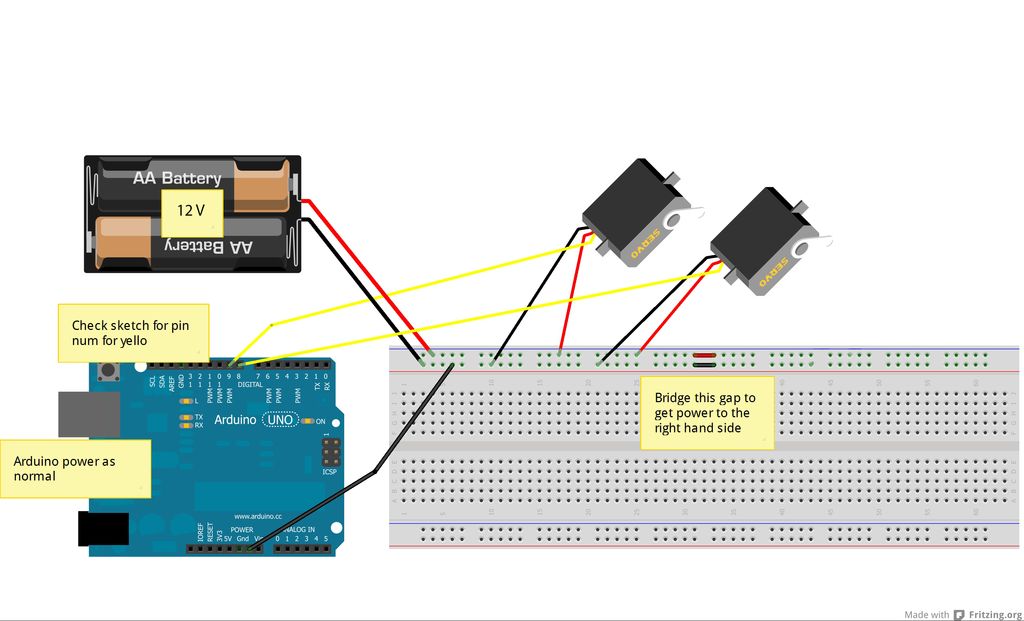
Now for the fun part! Since we need to power two servos at the SAME time, we cannot rely on power from an Arduino alone. An external power source is required for the motors. Each servo is rated to work at 4.8V – 6V. Therefore, a 12V power source (an 8 AA battery pack works well) for the motors should be fine. If the motors were controlled one at a time, you could easily run both off of the Arduino.
IMPORTANT NOTE: Although the Arduino will be run on a different power source from the motors, it must still share a common ground (see circuit diagram).
For more detail: Tracking Cat Eyes via Kinect using Arduino
- What is the main idea of this project?
Use a Kinect to track movement and drive two servo-mounted eyeballs so they follow people behind a poster. - What kind of balls are recommended for eyeballs?
Round balls larger than the eye holes; the guide used 1 1/2 inch wooden balls. - How should eyeballs be attached to the servos?
Glue the eyeballs to a servo horn (with the servo in its normal state) then attach the horn to the servo, allowing about 90 degrees rotation each way. - Can the servos be powered from the Arduino?
No; because both servos run at the same time, an external power source is required rather than relying solely on the Arduino. - What power source is suggested for the servos?
An 8 AA battery pack (around 12V) is suggested and works well for the servos rated 4.8V–6V. - Is there any important wiring consideration when using an external power source?
Yes; the Arduino and servo power supply must share a common ground. - What should be used to mount the motors to the poster?
A lightweight but sturdy platform such as leftover styrofoam glued to the back of the poster is recommended. - What poster selection tip is given?
Choose a poster that already has eyes printed to make tracing and realistic blending easier. - Why match paint color and pupil shape to the original figure?
Matching color and pupil shape helps the eyeballs blend into the poster and appear more realistic.
