
Summary of Program an ATtiny with Arduino
This article guides users on programming ATtiny85/45 microcontrollers via the Arduino IDE, treating them like standard Arduino boards. It details hardware setup, circuit wiring, installing the ArduinoISP sketch, adding a filter capacitor, and configuring core files to enable direct chip programming for compact projects.
Parts used in the ATtiny Programming Project:
- Arduino
- Breadboard
- ATtiny85 (or ATtiny45)
- 10uF 16V electrolytic capacitor
- 220ohm 1/4 watt resistor
- LED
- Solid core hookup wire
Follows are directions for programming the ATtiny microcontrollers using the Arduino IDE. In plain English, this is how to program 8-pin Atmel chips as you would normally an Arduino. This is cool because the ATtiny is tiny, and – well – this allows you to make tiny things that don’t need a big ol’ microcontroller.
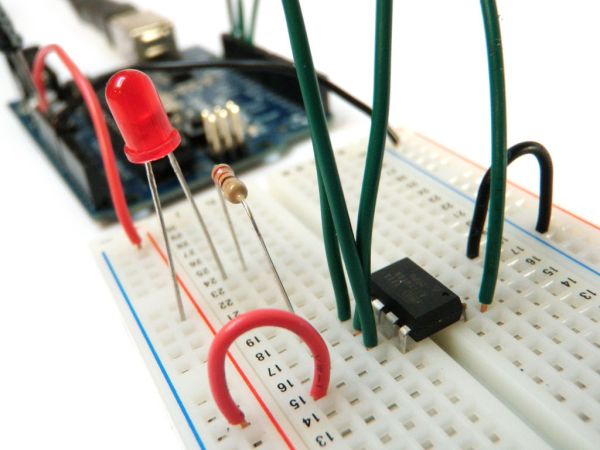 The instructions I have posted here are pretty much the same as instructions given by the incredibly awesome High-Low Tech Tutorial. I posted my version of the instructions here because I plan to make a couple of upcoming projects using ATtiny chips and figured I would show my process.
Step 1: Go get stuff
You will need:
– Arduino
– Breadboard
– ATtiny85 (or ATtiny45)
– 10uF 16V electrolytic capacitor
– 220ohm 1/4 watt resistor
– LED
– solid core hookup wire
Step 2: Wire the circuit
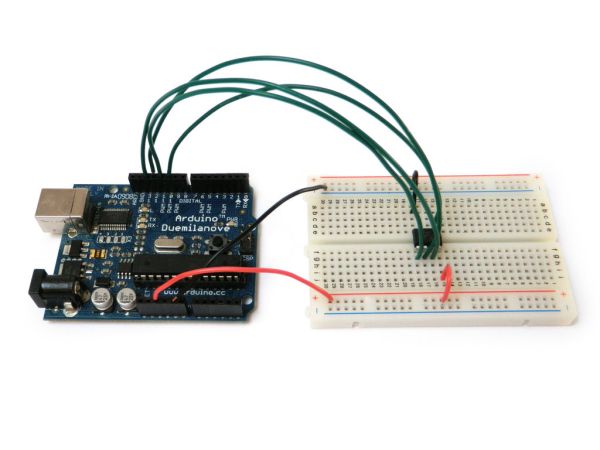
Connect the Arduino to the ATtiny as follows:
- Arduino +5V —> ATtiny Pin 8
- Arduino Ground —> ATtiny Pin 4
- Arduino Pin 10 —> ATtiny Pin 1
- Arduino Pin 11 —> ATtiny Pin 5
- Arduino Pin 12 —> ATtiny Pin 6
- Arduino Pin 13 —> ATtiny Pin 7
Step 3: Program the Arduino
Select the “ArduinoISP” sketch from the “Examples” menu.
Upload the sketch to your Arduino as you would any other sketch.
Your Arduino is now configured as a serial programmer that can program other chips.
Step 4: Filter cap
Put the 10uF capacitor between ground and the Arduino reset pin. Make sure to keep an eye on the capacitors polarity (ground to ground!).
It is rumored you only need this for the Arduino Uno, but I have found it helped matters to include it with earlier versions as well. If you find that it is not working in the next steps, simple remove it and see if that helps.
Step 5: ATtiny core files
Take note of your sketchbook folder from the Arduino preference menu.
Create a new folder in your sketchbook folder called “hardware”
Then, go to this page and download the file: attiny45_85.zip
Unzip this file and leave it in the new hardware folder.
Finally, restart the Arduino programming environment. The new cores should now be loaded.
Note that there are also core files for a number of other ATtiny chips. This pageis a good starting point for interfacing with a wide range of them using the Arduino.
For more detail: Program an ATtiny with Arduino
- What components are required to program an ATtiny using an Arduino?
You will need an Arduino, breadboard, ATtiny85 or ATtiny45, a 10uF 16V electrolytic capacitor, a 220ohm 1/4 watt resistor, an LED, and solid core hookup wire. - How do I connect the Arduino pins to the ATtiny pins?
Connect Arduino +5V to ATtiny Pin 8, Ground to Pin 4, Pin 10 to Pin 1, Pin 11 to Pin 5, Pin 12 to Pin 6, and Pin 13 to Pin 7. - Which sketch must be uploaded to the Arduino to act as a programmer?
Select the ArduinoISP sketch from the Examples menu and upload it to your Arduino. - Why is a 10uF capacitor needed between ground and the Arduino reset pin?
The capacitor helps with stability during programming; while rumored only necessary for Uno, it helped in earlier versions too. - How can I install the ATtiny core files in the Arduino environment?
Create a hardware folder in your sketchbook directory, download attiny45_85.zip, unzip it into that folder, and restart the Arduino software. - Can I use other ATtiny chips besides the ATtiny85 or ATtiny45?
Yes, core files exist for many other ATtiny chips available through the referenced page for interfacing.
