
Summary of nRF24L01+ 2.4 GHz wireless connectivity with the TinyK20 board
This article details enabling 2.4 GHz wireless connectivity on the tinyK20 board using an inexpensive Nordic Semiconductor nRF24L01+ transceiver for under $3. The setup utilizes RNet wireless stacks and Processor Expert components within Eclipse NXP Kinetis Design Studio, featuring a command-line interface via Segger RTT and support for USB CDC or UART connections.
Parts used in the tinyK20 nRF24L01+ Project:
- Nordic Semiconductor nRF24L01+ transceiver
- tinyK20 board
- Eclipse (NXP Kinetis Design Studio)
- RNet wireless network stack
- Processor Expert components
- Segger RTT
I’m using the tiny and inexpensive Nordic Semiconductor nRF24L01+ transceiver (see “Tutorial: Nordic Semiconductor nRF24L01+ with the Freescale FRDM-K64F Board“) in many projects: it costs less than $3 and allows me to communicate with a proprietary 2.4GHz protocol in a low power way (see “IoT: FreeRTOS Down to the Micro Amps“). I have that transceiver now running with the tinyK20 board too:
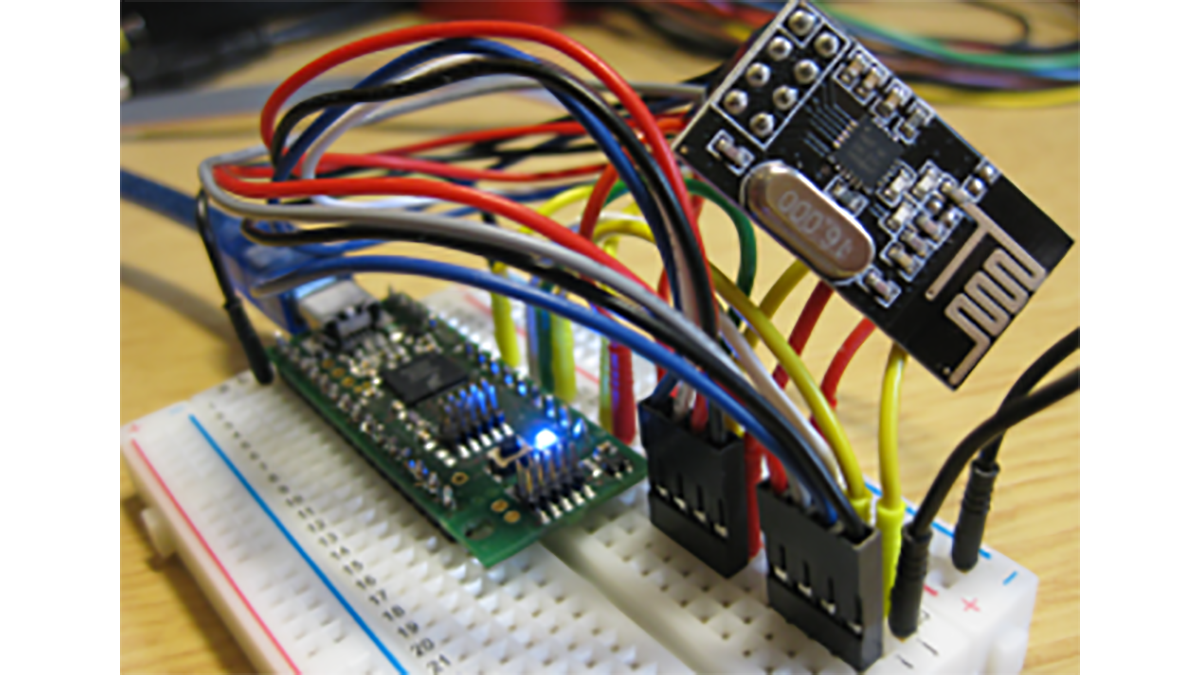
The normal 2×3 pin rows of the transceiver module are not very bread board friendly. I have used the following connections to the nRF module:
- SPI MISO: PTC7
- SPI MOSI: PTC6
- SPI SCK: PTC5
- CE: PTC2
- CSN: PTD1
- IRQ: not connected
- 3.3V: 3.3V
- GND: GND
The project is for Eclipse (NXP Kinetis Design Studio) and is using the RNet wireless network stack:
For easier portability to other microcontroller the project is using Processor Expert components which encapsulate the low-level drives and software stacks including the RTOS:
The project includes a command line interface (38400 baud, 8N1) to send and receive messages, to do remote command execution and to inspect the status of the transceiver using Segger RTT. Plus it includes a wireless packet sniffer.
Alternatively, a USB CDC or UART (Serial) connection can be used.
I’m not going much into details how to use the nRF24L01+, RNet and all the other components. Check the links at the end of this article for more details.
Summary
With this project I have the tinyK20 board enabled with 2.4 GHz wireless connectivity for less than $3 using the Nordic Semiconductor nRF24L01+ transceiver. I plan to use this in one of my next projects which need to have all board components in a small enclosure: here the tinyK20 fits well :-).
The sources of this project are available on GitHub here: https://github.com/ErichStyger/mcuoneclipse/tree/master/Examples/KDS/tinyK20/tinyK20_nrf
Happy nRF’ing ?
Links
- Using the Nordic Semiconductor nRF24L01+ transceiver: Tutorial: Nordic Semiconductor nRF24L01+ with the Freescale FRDM-K64F Board
- RNet stack: RNet Stack as Component, nRF24L01+ with Software SPI, Enhanced RNet Wireless Components and Communication Stack
- Segger RTT: Using Segger Real Time Terminal (RTT) with Eclipse
Read more: nRF24L01+ 2.4 GHz wireless connectivity with the TinyK20 board
- How much does the nRF24L01+ transceiver cost?
The transceiver costs less than $3. - What protocol does the transceiver use for communication?
It communicates using a proprietary 2.4GHz protocol. - Which SPI pins are connected to the nRF module?
SPI MISO connects to PTC7, SPI MOSI to PTC6, and SPI SCK to PTC5. - Does the project include a wireless packet sniffer?
Yes, the project includes a wireless packet sniffer. - Can I use a USB connection instead of UART?
Alternatively, a USB CDC or UART connection can be used. - What baud rate is used for the command line interface?
The command line interface operates at 38400 baud with 8N1 settings. - Where can I find the source code for this project?
The sources are available on GitHub at the provided link.
