
Summary of MECHANICAL KEYBOARD IS ALSO A MOUSE
This article highlights a unique custom mechanical keyboard built by Taliyah Huang that doubles as a mouse. The device uses two Arduinos in each half to communicate with a third Arduino connected to the laptop. Activating Caps Lock powers up optical mouse circuitry, enabling mouse functionality and Mac gestures without a dedicated peripheral. Despite ergonomic height issues and 24 hours of soldering, it offers full computer control.
Parts used in the Custom Split Keyboard:
- Arduino microcontrollers
- Optical mouse circuitry
- Caps Lock button
- Laptop connection interface
The mechanical keyboard community is a vibrant, if not fanatical, group of enthusiasts determined to find as many possible ways of assembling, building, and using as many high-quality keyboards as possible. With so many dedicated participants, most things that can be done with a keyboard already have been done. So when something as unique as this split keyboard that also doubles as a mouse pops up, we take notice.
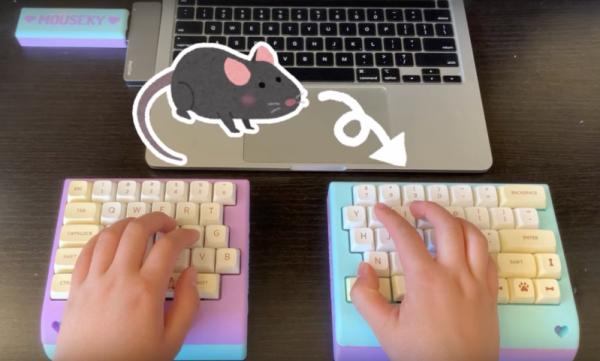
The keyboard is a custom build from [Taliyah Huang] which uses a pair of Arduinos, one in each half of the keyboard, to communicate key and mouse information to a third Arduino which is plugged in to her laptop. The right-hand half of the keyboard also includes the circuitry from an optical mouse, which gets powered up when the caps lock button is held down. When activated, this allows the keyboard to be used as a mouse directly. It also includes support for most Mac gestures as well, making it just as useful as a trackpad.
While there were some problems with the design, including being slightly too tall to be ergonomic and taking nearly 24 hours of soldering to complete, the prototype device is an interesting one especially since it allows for full control of a computer without needing a dedicated mouse. For other unique mechanical keyboard concepts, we recently featured this build which takes design and functionality cues from the Commodore 64.
Source: MECHANICAL KEYBOARD IS ALSO A MOUSE
- How does the keyboard switch to mouse mode?
Holding down the Caps Lock button powers up the internal optical mouse circuitry. - What hardware components are used for communication?
The build uses a pair of Arduinos in each half communicating with a third Arduino plugged into the laptop. - Does this device support Mac gestures?
Yes, the design includes support for most Mac gestures similar to a trackpad. - Is there a dedicated mouse required for this setup?
No, the device allows for full control of a computer without needing a dedicated mouse. - What was the time investment for building this prototype?
The project took nearly 24 hours of soldering to complete. - Was the final design considered perfectly ergonomic?
No, the author noted the device was slightly too tall to be ergonomic.
