
Summary of Controlling an Off-Grid Generator Over Wi-Fi with a Pair of Arduino Boards
Kaleb Clark modified his Honda EU-7000iS off-grid generator for wireless start, stop, and real-time status monitoring. He used two Arduino Nano 33 IoT boards (one in-house, one at the generator), relay modules to emulate the front-panel key and starter, MAX7221 LED drivers for seven-segment displays, and MQTT via a Cerbo GX power management system to coordinate solar, battery, and generator data and controls so solar supplies power when available and the generator automatically starts as needed.
Parts used in the Off-the-grid Generator Wireless Control Project:
- Honda EU-7000iS generator (existing)
- Front panel breakout cable (replaces key and starter button)
- Arduino Nano 33 IoT boards (two units)
- Relay modules (two units)
- MAX7221 LED driver modules (pair)
- Seven-segment display modules (multiple)
- Cerbo GX power management system
- Wiring and low-voltage signal conductors
Off-the-grid living
Residing in an area that’s removed from the nearest town/city provides an innumerable amount of benefits, yet many of the modern necessities we have come to expect in everyday life might be sorely lacking. One of the largest is, as the name “off-the-grid” implies, reliable access to electricity, meaning that most find themselves using a generator or some form of renewable energy source such as solar and wind. Kaleb Clark from element14 Presents utilizes both a generator and a solar backup, although his Honda EU-7000iS generator is quite far from his house and can be treacherous to reach in inclement weather, which is why he wanted to add wireless controls and monitoring to it.
How the system would work
Similar to a smart thermostat or other appliance, this remotely operated generator would need to not only have wireless starting capabilities, but also provide real-time data about its status and have a means to shut it down from inside the house. Clark wanted for his solar panels to provide nearly all of his house’s power whenever the sun is out and then quickly switch over to the generator backup when the clouds roll in. A front panel breakout cable takes the place of the key and starter button by allowing for one pair of conductors to enable the generator while connected and then turn over the starter motor when the other pair is briefly connected.
Getting the components
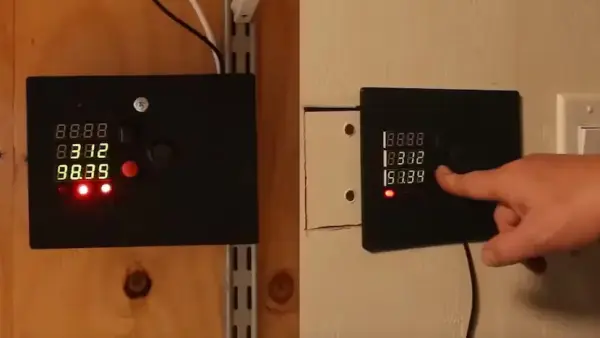
Performing the task of shorting each pair of front panel breakout wires together are two relay modules that, when signaled by a low-voltage source, close an internal contact and allow a current to flow across. The microcontroller and wireless module in this project is an Arduino Nano 33 IoT board. Each of the two is responsible for controlling the generator and displaying information on seven-segment display modules, with one being located inside the house and another inside the generator room. Since IO pins were running low due to the number of seven-segment LED modules, Clark added a pair of MAX7221 LED drivers.
Wireless communication and control
The power management system in this off-grid setup is a Cerbo GX which allows for the monitoring of multiple power inputs/battery charge state and even hosts its own MQTT broker service. Through it, Clark’s program running on the Arduino Nano 33 IoT boards can connect and then send or receive new information as it becomes available. Pressing the generator start button will trigger the generator to start once enabled while incoming information is parsed and displayed via a callback function so both modules always stay in sync.
Generator operation
When powered off, the panel’s top readout is dark and only begins displaying the wattage of the generator once it’s running. Below that is the wattage being produced by the solar panels, and the bottom seven-segment display cycles between the battery’s charge percentage and voltage.
Source: Controlling an Off-Grid Generator Over Wi-Fi with a Pair of Arduino Boards
- What microcontroller is used for wireless control?
The project uses Arduino Nano 33 IoT boards for wireless control and communication. - How does the system enable and start the generator?
A front panel breakout cable provides pairs of conductors that are shorted by relays to enable the generator and trigger the starter motor. - How are the seven-segment displays driven?
MAX7221 LED driver modules are used to drive the seven-segment display modules. - How does the Arduino communicate with the power management system?
The Arduino boards connect to the Cerbo GX which hosts an MQTT broker, allowing sending and receiving of status and control messages. - Where are the Arduino modules located?
One Arduino Nano 33 IoT board is located inside the house and the other is located in the generator room. - What data is shown on the generator panel displays?
The top display shows generator wattage when running, the middle shows solar wattage, and the bottom cycles between battery charge percentage and voltage. - Can the generator be shut down from inside the house?
Yes, the wireless controls allow the generator to be shut down remotely from inside the house. - Why were MAX7221 drivers added?
They were added because IO pins on the Arduino were running low due to the number of seven-segment modules.
