
Summary of BBC Micro Online
This project retrofits a 1980s BBC Micro with WiFi connectivity using an Arduino MKR1000. It allows the vintage computer to search for and load games from the bbcmicro.co.uk archive directly over the internet via HTTP range requests. The system implements custom *SEARCH and *MOUNT commands, enabling users to mount disc images as virtual floppies without physical media.
Parts used in the BBC Micro Internet Connectivity Project:
- Arduino MKR1000
- BBC Micro model B (Acorn Computers)
- 27C256 EPROM
- SparkFun Level Shifter Board
- Texas Instruments Hex Schmitt-Trigger Inverter
- Breadboard (generic)
- Jumper wires (generic)
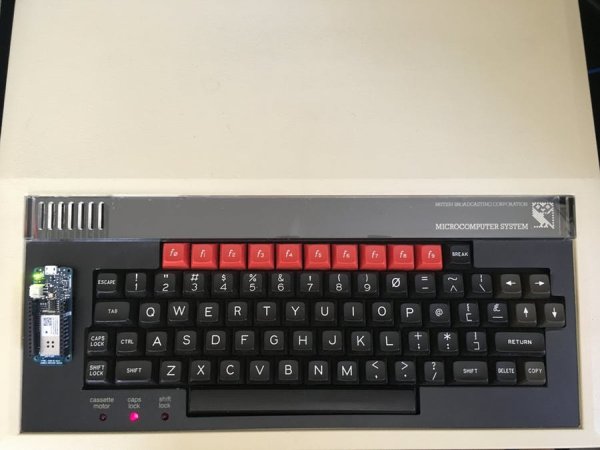
BBC Micro connects to WiFi, accesses games over the Internet.
Things used in this project
Hardware components |
||||||
 |
|
× | 1 | |||
|
× | 1 | ||||
|
× | 1 | ||||
 |
|
× | 1 | |||
|
× | 1 | ||||
 |
|
× | 1 | |||
 |
|
× | 1 | |||
Story
This project adds Internet connectivity to a 1980s BBC Micro using the Arduino MKR1000 with WiFi.
The BBC Micro can search the bbcmicro.co.uk archive for games disc images & loads them from direct from the Web.
There is still more to do, but Chuckie Egg, Frak, Repton, Pacman, Knight Lore, Jetset Willy tested OK so far 🙂
Background
I got my first Arduino MKR1000 recently and noticed it fitted nicely into the ‘ashtray’ hole poked to the side of my BBC Micro keyboard (the hole has been there since the ’80s…). So, I thought I’d try connecting them.
This project builds on Acorn community efforts to implement BBC Micro file system host in an Arduino. HostFS is very powerful – in this case it enables the Arduino to execute filesystem commands for the BBC Micro.
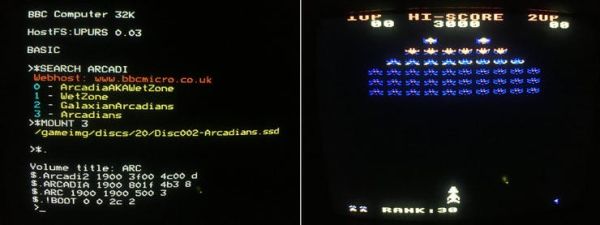
There are hundreds of games on bbcmicro.co.uk stored as Acorn DFS disc images (.SSD). The project enabled the BBC to support two new commands, *SEARCH and *MOUNT, that allow the BBC Micro to search for and mount any of these images as a virtual ‘floppy disc’.
When the BBC Micro issues a *LOAD, it sends a request to the Arduino. By using an HTTP range request, the Arduino can load specific memory regions of the disc image from the web server – and relay them to the BBC Micro.
Set Up
Arduino Sketch
The Arduino needs to connect to your wifi access point. You will need to define the SSID and password in the secrets.h file
In ArduinoHost.ino either edit the IP address, gateway and DNS defined in the code or remove them to enable DHCP client. Look in ArduinoHost.ino for this line:
//Edit this section for static IP, remove for DHCP
Edit as required, compile and upload to the Arduino MKR1000.
BBC Micro ROM
In our project, the BBC Micro becomes a file system client to the Arduino. In other words, every disc command you type in the BBC will sent to the Arduino to handle. This opens up a lot of possibilities!
To do this, UPURSFS client ROM image must be downloaded, burnt to an EPROM and inserted in a spare BBC Micro ROM socket.
The BBC micro has an internal PSU so mains voltages are present. Be sure to switch of the machine and be careful when working on it. I’ve found the BBC micro to be a robust machine, but any modifications or additions you make are at your own risk!
Connecting the Arduino to the BBC Micro
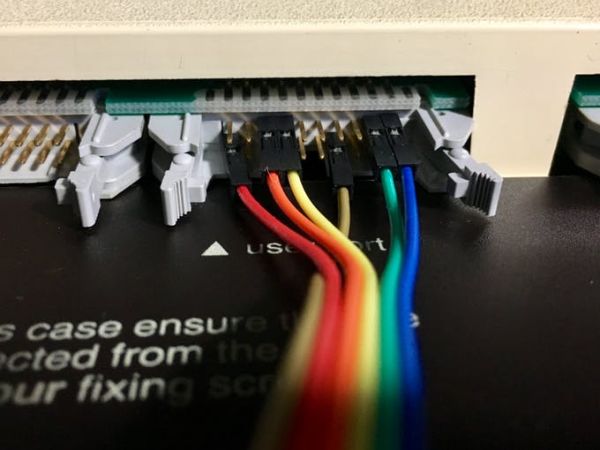
The Arduino is then connected to the BBC User Port for a UPURS connection- this gives us 115200 baud serial.
All signals be level shifted: 5v at the BBC and 3.3v at the Arduino – we do this with the bi-directional level shifter. On the BBC side, the ROM assumes RX and TX levels are inverted. We use an external hex inverter (SN74ACT14N) so the Arduino is presented with standard 115200 baud serial.
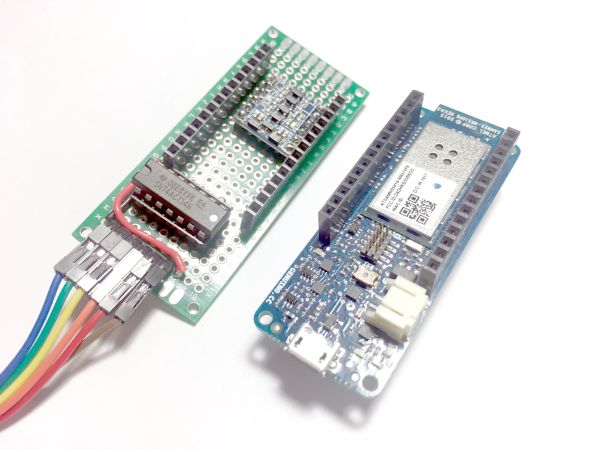
So you will be connecting your Arduino to a breadboard, and the breadboard to the BBC Micro User Port – for how to put the breadboard together see the Hardware Section.
Usage
Loading Games
With the BBC Micro powered on
- You should see HostFS:UPURS on boot up. If not, hit <break>+U
- Search bbcmicro.co.uk (limited number of results returned at the moment)
> *SEARCH ARCADI
- Select a disc image number to mount from the search results.
> *MOUNT 3
- Run game!
CHAIN"ARCADIA"
Save
*SAVE currently sends BBC memory region to the Arduino serial montior.
So when in MODE 7, typing
> *SAVE A 7c00 8000
will send BBC screen to the Arduino console
To Do
This was my first MKR1000 project, and I’m pretty happy with the start!
But there’s still lots to do. Lots of tidy-up, debugging and optimization still required. And many TubeHost functions still need to be implemented.
(And yes you can instead download games onto an SD card from a PC, and buy an MMC add-on for the beeb, but where’s the fun in that!)
Email, web-browsing… teletext browsing!? There are a lot of possibilities…
Hopefully this project inspires more development in this area. 🙂
Schematics
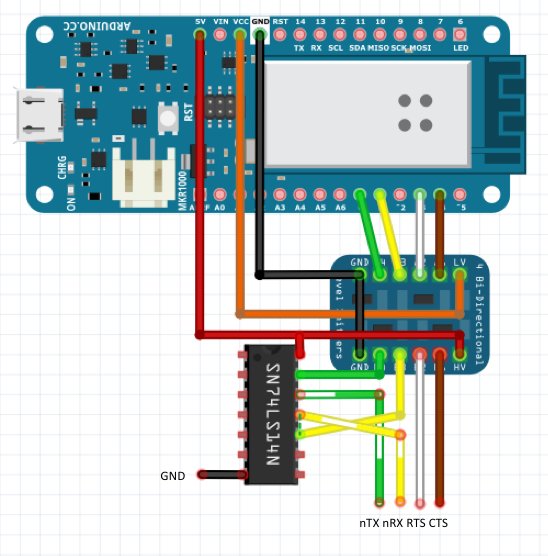
MKR level-shifting / inverting shield
BBC User Port – UPURS

Read more: BBC Micro Online
- How do I connect the Arduino MKR1000 to the BBC Micro?
The Arduino connects to the BBC User Port for a UPURS connection at 115200 baud serial. - Can I use DHCP instead of a static IP address?
Yes, you can remove the static IP configuration lines in ArduinoHost.ino to enable the DHCP client. - What is the best way to handle voltage differences between devices?
You must use a bi-directional level shifter because the BBC uses 5v while the Arduino uses 3.3v. - Does the BBC Micro need a special ROM to access the web?
Yes, the UPURSFS client ROM image must be downloaded, burnt to an EPROM, and inserted into a spare socket. - What command searches for games on the archive?
Users type *SEARCH followed by the game name to search the bbcmicro.co.uk archive. - How does the system load specific parts of a game file?
The Arduino uses HTTP range requests to load specific memory regions of the disc image from the web server. - Which command mounts a selected disc image?
After searching, you use the *MOUNT command followed by the number of the desired disc image. - Can I save the current screen memory to the Arduino console?
Yes, typing *SAVE A 7c00 8000 in MODE 7 sends the BBC memory region to the Arduino serial monitor. - What happens if the BBC Micro boots without HostFS detected?
If HostFS:UPURS does not appear on boot up, you should hit break+U to initialize it. - Are there any safety precautions when modifying the machine?
You must switch off the machine before working on it due to mains voltages present in the internal PSU.

Enables a BBC Micro to view an Arduino as a file system host over a serial connection.
Arduino connects to wifi, enabling the BBC Micro to mount a .ssd DFS disc image over the Internet.