
Summary of Make a WiFi Weather Station With Arduino
Summary: This article describes building a WiFi weather station using an Arduino Uno, the TI CC3000 WiFi chip (Adafruit CC3000 breakout recommended), and a DHT temperature and humidity sensor. It explains hardware choices, compatibility notes (Arduino Uno required for the CC3000 library), and recommends components like a 10K resistor. The project sends sensor data over WiFi to a computer for display.
Parts used in the WiFi Weather Station:
- Arduino Uno board
- Adafruit CC3000 breakout board (CC3000 WiFi chip)
- DHT11 temperature and humidity sensor (DHT22 can be used alternatively)
- 10K Ohm resistor (for DHT sensor)
- Level shifters (only if not using Adafruit breakout with regulators; mentioned as needed for some CC3000 boards)
- Connecting wires and breadboard or custom PCB (implied for connections)
As open-source hardware users and makers, we love playing with new chips, boards and tools. And there is one chip which is quite popular these days: the CC3000 WiFi chip from TI. This chip comes with many promises: cheap (around $10), easy to use, low-power … It was featured in many articles around the web, but somehow it was quite hard to use with Arduino as there was no breakout board or library available.
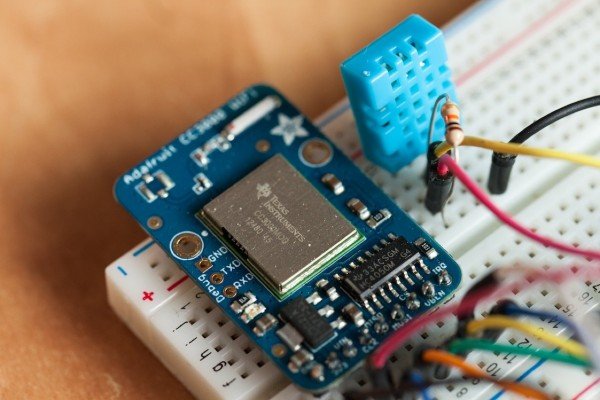
Luckily, Adafruit solved that for us with a nice breakout board and a working library for Arduino. In this article, I will show you how to use this chip for home automation purposes. Remember that weather station project? We are going to do the same: measure the temperature and the humidity. But this time we won’t display the information on an LCD screen. Instead, we will transmit the data wirelessly via WiFi to your computer and display it there. Excited ? Let’s get started!
Hardware requirements
The whole project is based on the Arduino platform, so of course you will need an Arduino board. I really recommend using the Arduino Uno board for this project, as it is the only board that is currently compatible with the CC3000 library at the time this article was written.
Then, you need the famous CC3000 chip. There are also many alternatives to do that. What I recommend is using the Adafruit CC3000 breakout board, which is the only one I tested that worked without problem. It is nice and compact, has voltage regulators onboard, as well as an onboard antenna. I tried the official TI CC3000 board, but it never worked properly, and you have the use level shifters as well (the CC3000 works with 3.3V, and the Arduino Uno with 5V). The other alternative is to make your own breakout board, there are many PCB layout available online.
You also need a DHT temperature & humidity sensor. I used the DHT11 sensor, but this project would also work fine with a DHT22, you would just have one line of code to change. You will also need a 10K Ohm resistor to be used with the DHT sensor.
For more detail: Make a WiFi Weather Station With Arduino
- Which Arduino board is recommended for this project?
The Arduino Uno is recommended because it is the only board compatible with the CC3000 library at the time of the article. - Which CC3000 hardware is recommended?
The Adafruit CC3000 breakout board is recommended as it worked without problems and includes voltage regulators and an onboard antenna. - Can I use the official TI CC3000 board?
The author tried the official TI CC3000 board but it never worked properly and required level shifters. - Which temperature and humidity sensor was used?
The DHT11 sensor was used; the DHT22 is an alternative requiring one code change. - Is a resistor needed for the DHT sensor?
Yes, a 10K Ohm resistor is needed for the DHT sensor. - Can I make my own CC3000 breakout board?
Yes, making your own breakout board is an alternative and many PCB layouts are available online. - What will the project do with the sensor data?
The project transmits temperature and humidity data wirelessly via WiFi to a computer for display.
