
Summary of Love Gauge Using Arduino
This article describes a "Love Gauge," a project allowing couples to visualize when the other is thinking of them. Using an Arduino with a WLAN module, a servo motor, and a wooden pointer, the device connects via a website. When one partner selects a message online, the physical gauge's pointer moves to indicate their thoughts. The build involves designing wooden parts with CorelDraw, laser cutting, and assembling the servo mechanism.
Parts used in the Love Gauge:
- Internet server
- Servo motor
- Arduino with network shield
- reaDIYmate board with WLAN
- CorelDraw software
- Laser cutter
- Wooden parts
- Sticky tape
- Screws
I’m working together with my wife. But sometimes one of us has an external appointment.
So, if one of us is thinking about the other, we want to show it together.
For this, I have made an Love Gauge for us.
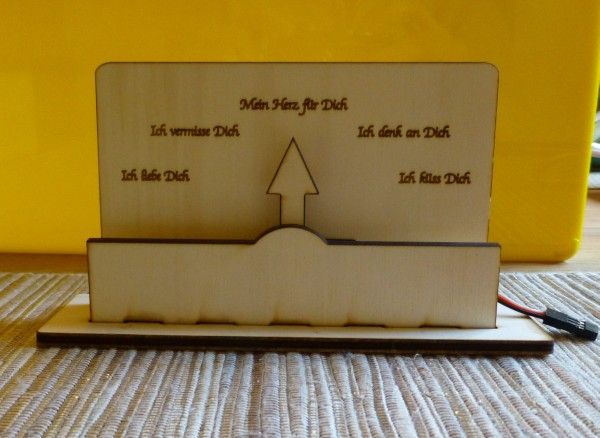
It stands on our desktop, or you can carry it somewhere else, cause it has an WLAN module.
If one of us thinking of the other, you can open the website and move the pointer to an message. The pointer of the Love Gauge on the desktop is moving to the message, and you know the other is thinking of you.
If you want to build it you need an internetserver, an servo and an Arduino with network shield. I used an reaDIYmate board with WLAN.
Step 1: Design
I have made an sketch with CorelDraw for the wooden parts and the background for the remote control program.
We have engrave and cut the wooden parts with an laser.
 Liebesbarometer_Skala.pdf
Step 2: Fix the servo
Now you put the servo inside the scale. It is an small cheap servo, cause the pointer is very light.
I fixed it with an sticky tape and two screws.
Step 3: Fix the pointer
First you need to set the servo with an computer to 90° and switch it of.
The diameter of the hole in the pointer is so small that you don’t need an screw to fix it. You can just press it on in the vertical position.
For more detail: Love Gauge Using Arduino
- What is the purpose of the Love Gauge?
The device allows partners to show each other when they are thinking of one another by moving a pointer. - How does the pointer move?
Moving the pointer on the desktop happens when someone opens the website and selects a message. - What hardware is required for the project?
You need an internet server, a servo, an Arduino with a network shield, and a reaDIYmate board with WLAN. - Can this device be moved around?
Yes, it can stand on a desktop or be carried elsewhere because it has a WLAN module. - What software was used to design the parts?
The author used CorelDraw to create sketches for the wooden parts and the remote control program background. - How were the wooden components created?
The wooden parts were engraved and cut using a laser based on the digital sketches. - How is the servo secured inside the scale?
The small cheap servo is fixed using sticky tape and two screws. - How is the pointer attached to the servo?
The pointer is pressed onto the vertical position at 90 degrees without needing a screw due to its small hole diameter.
