
Summary of LASER ENGRAVER USES ALL OF THE DVD DRIVE
This article describes repurposing old optical drives into a tabletop laser engraver by dismantling drives for shells and carriage mechanisms, building support structures, mounting a high-output laser, and using an Arduino with A4988 motor drivers to convert G-code into 2D movement. A commercial variant exists, and optical drives can also be used for other projects like a scanning laser microscope.
Parts used in the Laser Engraver:
- Optical drive shells (from dismantled DVD/optical drives)
- Carriages from dismantled hard drives (for X and Y axes)
- Particle board (support structure)
- Acrylic (support structure)
- High-output laser module
- Heat sink (for the laser module)
- Arduino
- Pair of A4988 stepper motor controllers
- Wiring and connectors (to connect electronics and motors)
- Fasteners and mounting hardware (to assemble components)
For the last ten to fifteen years, optical drives have been fading out of existence. There’s little reason to have them around anymore unless you are serious about archiving data or unconvinced that streaming platforms will always be around. While there are some niche uses for them still, we’re seeing more and more get repurposed for parts and other projects like this tabletop laser engraver.
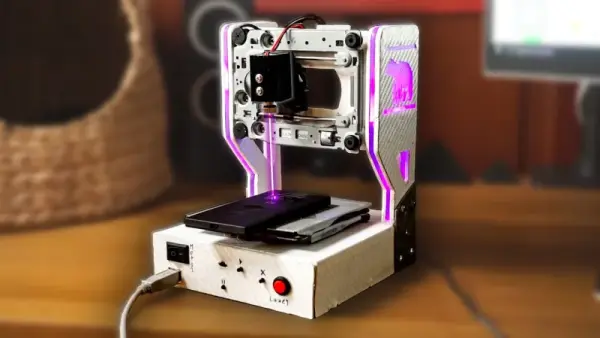
The build starts with a couple optical drives, both of which are dismantled. One of the shells is saved to use as a base for the engraver, and two support structures are made out of particle board and acrylic to hold the laser and the Y axis mechanism. Both axes are made from the carriages of the disassembled hard drives, with the X axis set into the base to move the work piece. A high-output laser module is fitted to the Y axis with a heat sink, and an Arduino and a pair of A4988 motor controllers are added to the mix to turn incoming G-code into two-dimensional movement.
We’ve actually seen a commercial laser engraver built around the same concept, but the DIY approach is certainly appealing if you’ve got some optical drives collecting dust. Otherwise you could use them to build a scanning laser microscope.
Source: LASER ENGRAVER USES ALL OF THE DVD DRIVE
- What is the source of the mechanical axes for the engraver?
The X and Y axes are made from carriages of the disassembled hard drives. - Can optical drive shells be used in the build?
Yes, one of the dismantled optical drive shells is saved to use as a base for the engraver. - What materials are used to make the support structures?
Two support structures are made out of particle board and acrylic to hold the laser and Y axis mechanism. - Which electronic controller converts G-code to movement?
An Arduino is used along with a pair of A4988 motor controllers to turn incoming G-code into two-dimensional movement. - What is fitted to the Y axis to perform engraving?
A high-output laser module with a heat sink is fitted to the Y axis. - Is this DIY idea similar to any commercial products?
Yes, a commercial laser engraver built around the same concept has been seen. - Are there alternative projects for optical drives mentioned?
Yes, the article mentions using optical drives to build a scanning laser microscope as another option.
