
Summary of ESP8266 touchscreen WiFi light controller and clock
Summary: The author bought inexpensive WiFi LED bulbs and built a touchscreen ESP8266-based alarm-clock-style controller to simplify bedside light control. They chose a SparkFun Thing board (ESP8266 with LiPo charge controller), designed a 3D-printed enclosure, and used a touchscreen for a modern interface. The project was motivated by convenience and experimentation with ESP8266 development.
Parts used in the ESP8266 touchscreen WiFi light controller and clock:
- WiFi-controlled LED bulbs
- SparkFun Thing (ESP8266 with integrated LiPo charge controller)
- Touchscreen display
- LiPo battery (for battery backup and charging)
- 3D-printed enclosure
- Header pins (for programming and connections)
- USB cable (for programming and power)
A couple of months ago I picked up cheap WiFi-controlled LED bulbs (one among dozens of very similar devices), after seeing them at a friend’s place. This turned out to be an excuse to play with the ESP8266, which has inspired several hacks.
I was overall very happy with these bulbs: decent Android and iOS apps and, compared to fancier solutions (e.g., Philips Hue or Belkin WeMo), they do not require any proprietary base stations, and you can’t beat the price! However, switching off the lights before falling asleep involved hunting for the phone, opening the app, and waiting for it to scan the network; not an ideal user experience. I was actually missing our old X10 alarm clock controller (remember those?), so I decided to make one from scratch, because… why not?
Although the X10 Powerhouse controller’s faux-wood styling and 7-segment LED had a certain… charm, I decided to go more modern and use a touchscreen. I also designed a 3D printed enclosure with simple geometric shapes and used it as a further excuse to play with 3D print finishing techniques. Here is the final result:
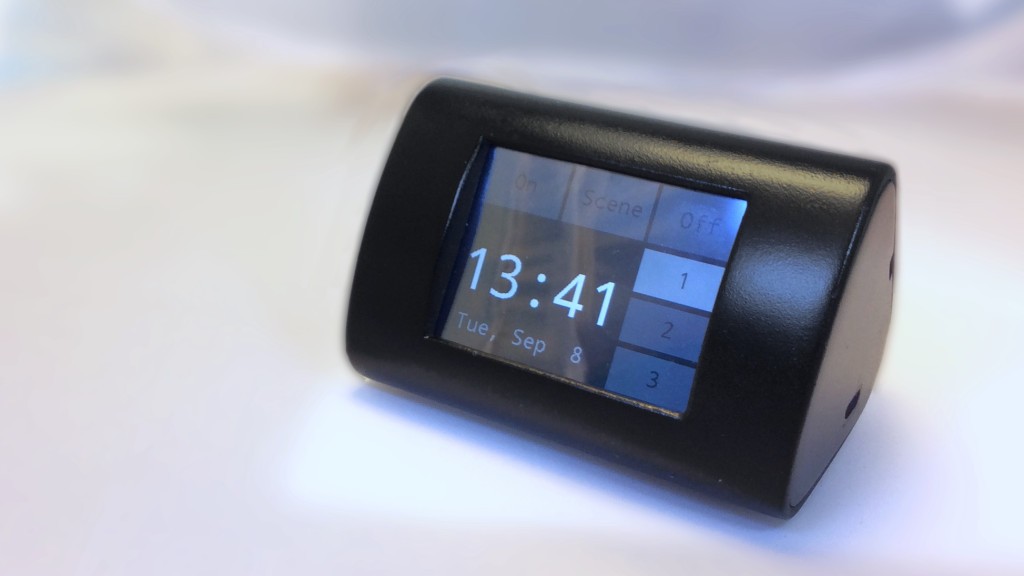
Component selection. There are several boards with the ESP8266, most of them using the ESP-12 module. I decided to go with the SparkFun Thing (which directly incorporates the ESP chip), as it also includes a LiPo charge controller. Perhaps overkill for battery backup, but nice to have. If you do use the charge controller, then the price is very reasonable (e.g., an Adafruit ESP breakout and Micro-LiPo combo will cost about the same–although flash is 4x larger and the ESP-12 module is FCC-approved). Also, it’s a very nice board for experimentation and it’s become my go-to ESP board: nice header layout, and the easiest to program (tip: instead of fiddling with the DTR jumper on the Thing, just cut your DTR wire and insert a pin header pair: once esptool starts uploading, just pull the pin and.. done!).
For More Details: ESP8266 touchscreen WiFi light controller and clock
- Why build a touchscreen WiFi light controller instead of using the bulbs app?
To avoid hunting for the phone and waiting for the app to scan the network, providing a quicker bedside control experience. - Which ESP8266 board did the author choose for the project?
The SparkFun Thing, which includes the ESP8266 and a LiPo charge controller. - Why did the author like the SparkFun Thing board?
Because it has a nice header layout, integrated LiPo charging, is easy to program, and is a good board for experimentation. - Is the LiPo charge controller necessary for the project?
No, it may be overkill for battery backup but is a convenient feature to have. - What enclosure did the author use for the controller?
A custom 3D-printed enclosure with simple geometric shapes, finished as part of the build. - How did the author simplify programming the Thing board?
By cutting the DTR wire and inserting a pin header pair, then pulling the pin once esptool starts uploading. - Are there alternative ESP8266 board options mentioned?
Yes, the author mentions an Adafruit ESP breakout combined with a Micro-LiPo as an alternative, noting differences in flash size and FCC approval.
