
Summary of DIGITIZE YOUR SLIDE DECK WITH THIS ARDUINO-POWERED SLIDE CAROUSEL
This article describes Scott Lawrence's project to digitize 35mm slides by connecting a DSLR camera to a Kodak slide carousel. The system uses a custom 3D-printed adapter, an Arduino Leonardo for automation, and a compact LED light source to replace the original projector bulb. This setup automates the process of advancing slides and triggering the camera shutter, making it easier to convert large collections of old slides into digital formats.
Parts used in the Arduino-Powered Slide Carousel Digitizer:
- Nikon D70 DSLR Camera
- Kodak 760 Slide Carousel
- 3D-Printed Adapter
- Macro Lens
- IR Transmitter
- Compact LED Studio Light
- Arduino Leonardo
- Central User Interface
If you’re above a certain age, you probably remember the atmosphere of a pre-Powerpoint 35 mm slide show. The wobbly screen being unrolled, the darkened room, the soft hum of the projector’s fan, the slightly grainy picture on the screen and that unmistakable click-whoosh-clack sound as the projector loaded the next slide. Nowadays you’ll be hard pressed to find anyone willing to set up a screen and darken the room just to watch a few photos, so if you still have any slides lying around you’ll probably want to digitize them. If you’ve also kept your projector then this doesn’t even have to be that difficult, as [Scott Lawrence] shows in his latest project.
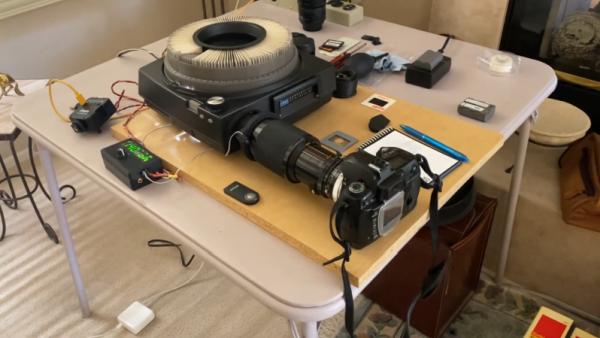
The carousel’s original light source was replaced with a compact LED studio light, which allows for precise brightness control and of course remains nice and cool compared to the original incandescent bulb. The light, camera and carousel motor are all controlled through a central user interface driven by an Arduino Leonardo which can automatically advance the carousel and instruct the camera to take a picture, thereby taking the hard work out of digitizing huge stacks of slides.
Source: DIGITIZE YOUR SLIDE DECK WITH THIS ARDUINO-POWERED SLIDE CAROUSEL
- How can I digitize old 35mm slides using a projector?
You can connect a DSLR directly to a slide carousel using a 3D-printed adapter and control the process with an Arduino. - What camera model was used in this project?
The project utilized a Nikon D70 DSLR camera. - Does the system use the original projector light?
No, the original incandescent bulb was replaced with a compact LED studio light for better brightness control and cooler operation. - How does the camera get triggered automatically?
An IR transmitter held in the adapter aims at the camera receiver to trigger the remote shutter release function. - What controls the motor and camera functions?
An Arduino Leonardo drives the central user interface that advances the carousel and instructs the camera to take pictures. - Can I build this if I do not have a projector?
Yes, a simple 3D-printed slide adapter for your camera works for small slide decks without needing a projector. - Where can I find the software and design files?
The creator plans to make the software and STL files available on GitHub soon. - What is the main benefit of replacing the original light source?
Replacing the bulb allows for precise brightness control and prevents the heat issues associated with the original incandescent bulb.
