
Summary of Cheapest Plug & Play Room Automation Setup
This article details a low-cost room automation project using an Arduino Beginners Kit to control wall switches wirelessly. It replaces expensive relays with a linear actuator system where a stepper motor moves a servo motor to toggle switches. The setup utilizes cardboard, screw rods, and a DIY limit switch for positioning, controlled via an IR remote to ensure safe, simple operation without complex electrical wiring knowledge.
Parts used in the Cheapest Plug & Play Room Automation Setup:
- Arduino or any other Microcontroller
- Stepper Motor With Motor Drive
- Servo Motor
- Screw Rod (Diameter: 8mm) with Copper Nut
- Coupler (8mm * 5mm)
- External Power Supply (Optional)
- Cardboard or Foam Board
- IR Receiver and Remote
- Wire
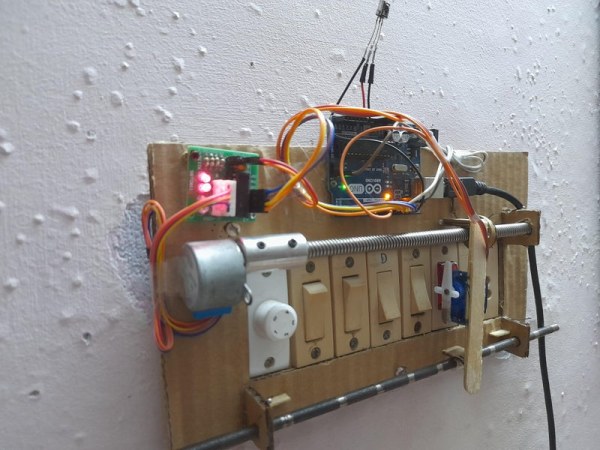
Their are many people who are struggling to make projects that are needed for their daily needs. One of the major example is none other than room automation. Even though many of the room automation setup cost a little bit higher can’t we make it little bit cheaper. Can’t we make it using the Arduino’s beginners kit?
My answer is “Yes, It’s possible!”
Supplies
1)Arduino or any other Microcontroller
2)Stepper Motor With Motor Drive
3)Servo Motor
4)Screw Rod(Diameter: 8mm & Length: Depends upon you ) with Copper Nut
5)Coupler(8mm * 5mm)
6)External Power Supply(Optional)
7)Cardboard or Foam Board
8)IR Receiver and Remote
9)Wire
Step 1: How to Control the Switch?
Normally many of them prefers to use relay for controlling which deals with the internal circuit of your house. If you are not expert in handling it, avoid it!
In order to make this project simple and different I have used the one of the core component used in 3d printing. It’s none other than linear actuator. Here our linear actuator would be controlling the vertical movement of servo motor, whereas the servo motor is used to turn the switch on & off.
e.g.:- Turning the lights on
- We have to find how much the Stepper motor has to rotate in order to reach the switch.
- We have to set the value of how much the servo has to turn in order to turn on the switch.
- After a delay of few seconds we have to set the servo back to its initial position.
- Stepper motor has to return to the position from where it has came from(-rotate).
By these conditions our program looks like this:
if(lights="on"){
myStepper.set(Rotate);// How much the stepper motor has to turn to reach the switch?
myservo.write();//How much the servo has to turn in order to turn on the switch?
delay(1000);// Wait 1 second
myservo.write();// Set servo to initial position
myStepper.set(-Rotate);// Stepper motor turns back to initial position
}
Note:
- Even though stepper motor is accurate in it movement it doesn’t has the ability to know how much it have rotated, because if a power failure occurs it won’t go back to its initial position and consider the current point as initial position.
In order to solve this problem we have to add another core component of a 3D Printer called the Limit Switch. Since It is easy to make a DIY limit Switch using wire, I didn’t went to buy it!
- If you wish to add a DIY Limit Switch, then you can remove this code mentioned above. Because the program is created in such a way that after a command the stepper motor has to return to its initial position.
myStepper.set(-Rotate);// Stepper motor turns back to initial position
Step 2: Building & Testing
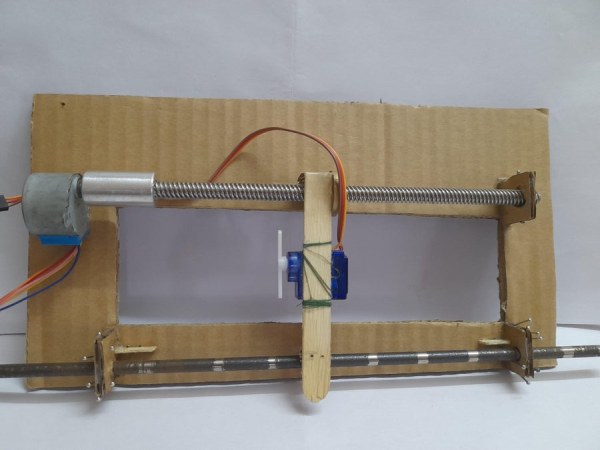
Here making this model always depends upon how you control your switch.
In my case, First I had to cut-out the layout that would be mounted to the switchboard.
Then I had to stick the stepper motor and a small holder made out of cardboard in order to keep the Screw Rod in position.
Since the diameter of the Stepper motor and the screw rod was different, I had to link it together with the help of a coupler.
After that I had to create a stand for our servo motor which is attached to the copper nut (image 4).
Since it is important that our servo stand moves freely I had to add a supporting structure using an iron rod.
After all these I had to add my DIY Limit Switch, Which would be locating at the top. When the wire placed on the copper nut of the Servo Stand touches this Limit Switch, Stepper motor goes off.
Note
- Please make sure that the structure you are making is enough strong especially the stand where the servo motor is placed. If it is not that strong, It might not give you a proper result as expecting!
- Also make sure that a small gap is left between the servo and the switch. This would ensure a smooth movement.
- While testing you people might find that even if the servo motor spins, it might only do one command perfectly or else it doesn’t do anything as shown in the video below. So sometimes you might need to make some adjustment within the horns itself.(Don’t know what is meant by horns? Click HERE!)
Step 3: Finally Programming It!
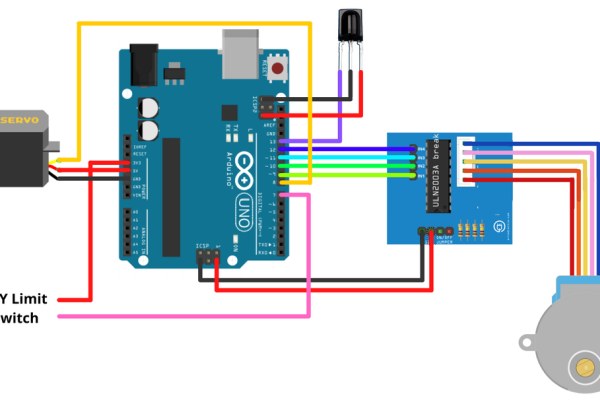
After making and testing your model, Its time to control it wirelessly. Since the Arduino UNO Beginners kit provides an IR Receiver as well as a Remote, Our path is perfect. But if you doesn’t have it, not need to worry at all. Because this is just a beginning. Their are many ways how we could modify this project. So Stay tuned!
If you want the code, CLICK HERE!( Link to Arduino Web Editor)
Since I am beginner in Arduino Programming, I have tried to make this code as simple as possible so that you could understand what I have written.
Explaining it
Lets divide the whole code into two parts: Stepper Initial Position & IR Remote controlling
Stepper Initial Position
In the Void Loop, I have started with the If conditions which state that the Stepper motor will rotate clockwise until it recieve HIGH signal from our DIY Limit Switch.(Reason to use DIY Limit Switch mentioned on Step 2).
IR Remote controlling
For Example
If our IR Receiver Receives “0xEF807F” signal and if our Switch1 is “off”, then our stepper motor has to take -21000 steps to reach Switch1 and the servo has to turn 30 degrees to turn on the switch and after a delay of 1.5 seconds our servo will move to its initial position and states that Switch1 is turned “on”. If our IR Receiver again Receives “0xEF807F” signal and if Switch1 is “on” then our stepper motor has to take -21000 steps to reach the switch and the servo has to turn 180 degrees to turn off the switch and after a delay of 1.5 seconds our servo will move to its initial position and states that Switch1 is “off”.
This same conditions is being applied to all the switch.
Here we haven’t included the stepper motor to rotate back because when the Switch case gets breaks, our DIY Limit Switch will be having a “LOW” value which makes the stepper motor rotate back. Because of this we will be having a problem that is we can only send 1 IR Signal at a time. In order to send another signal you have to wait until the Servo stand reaches it’s initial position.
These are some of the working videos.
Source: Cheapest Plug & Play Room Automation Setup
- How can I control the switch without handling internal house circuits?
Use a linear actuator system where a stepper motor moves a servo motor to physically turn the switch on and off. - Can I make a limit switch myself instead of buying one?
Yes, you can create a DIY limit switch using wire that triggers when it touches the copper nut on the servo stand. - What happens if the power fails during operation?
A stepper motor alone cannot track its position after a power failure, so a limit switch is required to reset the initial position. - How do I connect the stepper motor to the screw rod if they have different diameters?
You must use a coupler to link the stepper motor and the screw rod together. - Why is a supporting iron rod needed for the servo stand?
The iron rod provides a structure that allows the servo stand to move freely while maintaining stability. - Does the code require the stepper motor to return to the start position after every command?
No, the code skips the return rotation to allow sending multiple signals quickly, relying on the limit switch to reset the position. - What signal does the IR receiver look for to operate Switch1?
The system looks for the specific signal 0xEF807F to trigger the actions for Switch1. - How long should the servo wait before returning to its initial position?
The program includes a delay of 1.5 seconds before the servo returns to its initial position. - What material is recommended for building the model layout?
Cardboard or foam board is recommended for cutting out the layout and mounting the components. - Can this project be modified if I do not have an IR receiver?
Yes, the author notes that the IR component is just a beginning and there are many ways to modify the project.
