
Summary of Arduino quiz show buzzer
A simple Arduino-based quiz show buzzer that locks out other players when one presses their button, lights an LED of that player’s color, and lets the host award points via a master button. It uses an ATmega328, 7-segment serial display, tones via speaker, and large colored buttons for four players. A reported issue: the display turns off while a tune plays.
Parts used in the Arduino quiz show buzzer:
- Rocker Switch
- ATmega328
- Ceramic Resonator 16MHZ
- 5V wall adapter power supply
- Barrel jack
- Hook-up wire (black, red, green, white, yellow)
- Heat shrink tubing
- Big buttons (green, blue, yellow, red)
- Some LEDs
- Serial 8 Characters x 7 Segment LED Display
- Prototyping board
- Tamiya connectors (male, female)
- Some resistors (1x100ohm for the speaker)
- Some resistors (5x150ohm for the LEDs)
- Some resistors (6x10KOhm for the buttons)
- Push buttons (2)
- Speaker wire
A good friend of mine who’s a teacher was doing quizzes in her class making students compete to answer questions… resulting in them complaining they raised their hands before the others.
I decided to give her this quiz show type buzzer for Christmas to solve her problems.
When one of the players press it’s button (the fastest player wins this), the led of the right colour lights up saying he’s in control… and no other buttons from the other players work, until the master of the game decides if the answer is good or not by pressing a little button on the main unit, giving a point or not to the player in control.
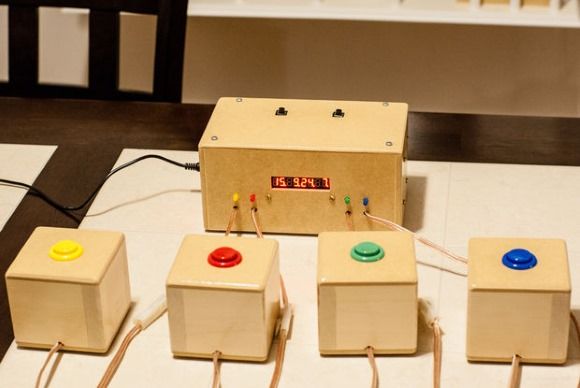
If you have any questions, comments, constructive criticism… don’t hesitate to write 🙂
Oh and you can like my video on YouTube, that would be nice 🙂
P.S. There is a little problem with the display that I couldn’t figure out how to solve. When playing a tune, the display doesn’t light up anymore, like if no current goes to it anymore… anybody has an idea what the problem could be or how to fix it in code ? See the video if you don’t understand what I mean.
Step 1: Components
- Rocker Switch
- ATmega328
- Ceramic Resonator 16MHZ
- 5V wall adapter power supply
- Barrel jack
- Hook-up wire (black, red, green, white, yellow)
- Heat shrink tubing
- Big buttons (green, blue, yellow, red)
- Some LEDs
- Serial 8 Characters x 7 Segment LED Display
- Prototyping board
- Tamiya connectors (male, female)
- Some resistors (1x100ohm (for the speaker), 5x150ohm (for the leds), 6x10KOhm (for the buttons))
- Push buttons (2)
- Speaker wire
Step 2: The Plan
Sorry for my writing… I know it’s not a very professional plan, but if I have more time I will make a better one and replace it… feel free to ask me anything about it if it’s not clear 😉
For more detail: Arduino quiz show buzzer
- What happens when a player presses their button?
The LED of the right colour lights up and no other buttons work until the master decides. - How does the host award a point?
The master presses a little button on the main unit to give a point to the player in control. - Which microcontroller is used in the project?
The project uses an ATmega328. - What display is used for showing information?
A serial 8 Characters x 7 Segment LED Display is used. - What power supply does the project use?
A 5V wall adapter power supply connected via a barrel jack is used. - How many player buttons are there and what colours are they?
There are four big player buttons: green, blue, yellow, and red. - Does the project include sound output?
Yes, it uses a speaker (with a 100 ohm resistor) to play tunes. - What problem is reported with the display?
When playing a tune, the display stops lighting as if no current goes to it anymore. - Are pull-down or pull-up resistors used for the buttons?
Yes, the parts list includes six 10 KOhm resistors for the buttons. - What connectors are used for wiring?
Tamiya connectors (male and female) are used in the project.
