
Summary of Arduino Mkr1000 and Java Swing Shooting Game
This project is a Christmas-themed shooting game where the player controls Santa to defeat Rudolph. It integrates Arduino MKR1000, Uno, and Leonardo boards with Java software. The MKR1000 reads joystick data via Wi-Fi to control movement in the Java application. The Uno board communicates via Bluetooth with the Leonardo, which simulates keyboard presses for shooting actions. The system creates an interactive holiday gaming experience combining hardware inputs with desktop software logic.
Parts used in the Christmas Shooting Game:
- Arduino UNO & Genuino UNO
- Arduino Leonardo
- Arduino MKR1000
- 3.7V battery
- HC-06 Bluetooth Module (x2)
- Arcade Button
- Joystick
Arduino Mkr1000 + Uno + Leonardo + Java = Christmas shooting game.
Things used in this project
Hardware components |
||||||
 |
|
× | 1 | |||
 |
|
× | 1 | |||
 |
|
× | 1 | |||
|
× | 1 | ||||
|
× | 2 | ||||
|
× | 1 | ||||
|
× | 1 | ||||
Story
I made so cool Christmas shooting game! The player is Santa and Monster is Rudolph! Also background music of the game is goes well with Christmas! This is just my opinion. I created it for the Internet of Holiday Things because Always Playing game is so funny, so I thought playing game on Holiday is also funny!
How it does work
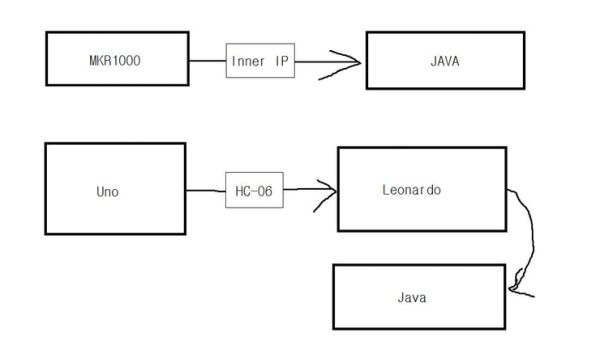
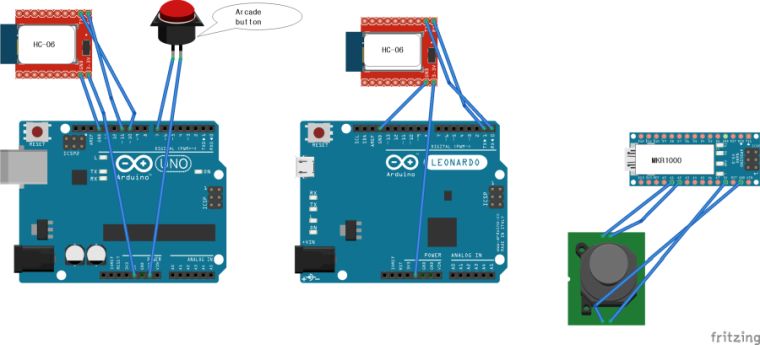
First, I’ll talk about Computer(java)-to-board connection relationship: I wrote some Java code that can communicate with Arduino. Mkr1000 and Java are connected directly using inner IP. If we move joystick, Mkr1000 send joystick’s movement to the Java.
Uno and Leonardo are connected by Bluetooth(HC-06). If we push shooting Arcade Button. The fact that we push it is sent to Leonardo. And Leonardo receive it and press space bar using Keyboard library.
And then, Java notice that space bar was pressed and shoot! That’s All!
Photo
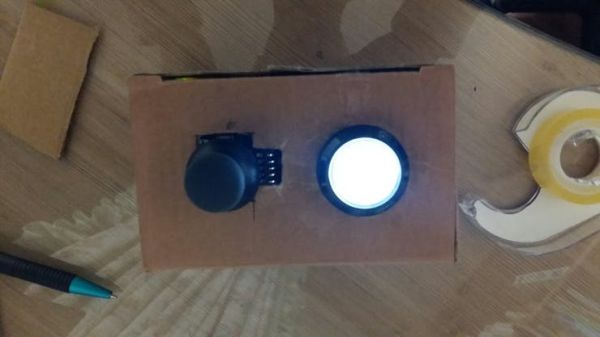
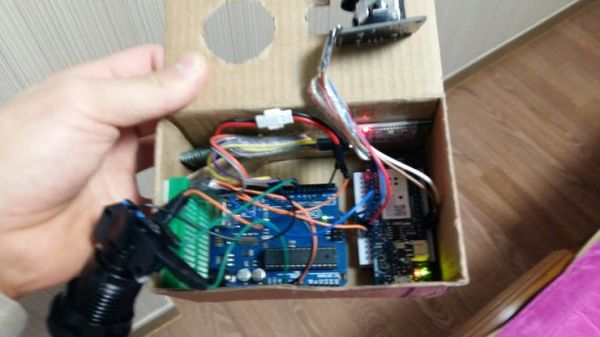
After it, I just put everything in the box! HAHAHAHAHA (Don’t forget to decorate the box!)
Before you use my Java code
I did post the all code of Java, but if you use this code, you have to change IP and save some photos (Santa figure, Rudolph picture, background, robot picture) to a (file with code) finally, you have to add some music you want.
Each file name:
- background.jpg
- Christmas.gif
- happyXmas.jpg
- JingleBell.wav
- robot.png
Review
I think Writing Java code is more difficult than creating a game machine. But Arduino has evolved this game.
Finally
What A Fantastic game it is!
Schematics
Code
arduino uno
Arduino
#include <SoftwareSerial.h>

SoftwareSerial mySerial(10, 11); // RX, TX

void setup() {
  pinMode(7,INPUT_PULLUP);
  mySerial.begin(9600);
}

void loop() { // run over and over
  if(digitalRead(7)==0)
    mySerial.print("a");
    delay(300);
}
public class NetWork {
		private Socket socket;
		InputStream in;
		public NetWork(){
			try {
				socket = new Socket("mkr1000's inner Ip",mkr1000's inner port);
				in = socket.getInputStream();
			} catch (UnknownHostException e) {
				e.printStackTrace();
			} catch (IOException e) {
				e.printStackTrace();
			}

		}
		private char getText(){
			try {
				if(in.available()>0)
					return (char) in.read();//read direction
			} catch (IOException e) {
				//ignore
			}
			return 'N';//no move
		}
musicPlayer.java
Java
import java.io.File;


import javax.sound.sampled.AudioSystem;

import javax.sound.sampled.Clip;


public class MusicPlayer implements Runnable{

	public Clip clip;
	private	File file;

	public MusicPlayer(String musicFileName){
		file=new File(musicFileName);

	}
	public MusicPlayer(File musicFile){
		file=musicFile;
	}
	@Override
	@Deprecated
	public void run() {
		try{

			clip = AudioSystem.getClip();

			clip.open(AudioSystem.getAudioInputStream(file));
			clip.loop(Clip.LOOP_CONTINUOUSLY);
			clip.start();


			Thread.sleep(clip.getMicrosecondLength()/1000);

		}

		catch(Exception e){
			e.printStackTrace();
		}


	}
	public void Pause(){
		clip.stop();
	}
	public void Stop(){
		clip.stop();
		clip.close();
	}
	public void ReStart(){
		clip.start();
	}
	public void Start(){
		new Thread(this).start();
	}
	public void StartAtFirst(){
		try {
			clip.close();
			clip=AudioSystem.getClip();
			clip.open(AudioSystem.getAudioInputStream(file));
			Start();
		} catch (Exception e) {
			// TODO 자동 생성된 catch 블록
			e.printStackTrace();
		}
	}

}
NetWork.java
Java
package : MM
package MM;


import java.io.IOException;
import java.io.InputStream;

import java.net.Socket;

import java.net.UnknownHostException;

public class NetWork {
		private Socket socket;
		InputStream in;
		public NetWork(){
			try {
				socket = new Socket("192.168.0.2",80);
				in = socket.getInputStream();
			} catch (UnknownHostException e) {
				e.printStackTrace();
			} catch (IOException e) {
				e.printStackTrace();
			}

		}
		private char getText(){
			try {
				if(in.available()>0)
					return (char) in.read();
			} catch (IOException e) {
				//ignore
			}
			return 'N';
		}
		public Reaction getReaction() {
			char result = getText();
			switch(result){
			case 'R': return Reaction.Right;
			case 'B': return Reaction.Behind;
			case 'F': return Reaction.Front;
			case 'L': return Reaction.Left;
			}
			return Reaction.NM;
		}
		public void dispose(){
			try {
				socket.close();
				in.close();
			} catch (IOException e) {
				// TODO Auto-generated catch block
				e.printStackTrace();
			}
		}
}
- How does the MKR1000 communicate with the Java program?
The MKR1000 connects directly to Java using its inner IP address over Wi-Fi to send joystick movement data. - Can the Uno and Leonardo connect without wires?
Yes, they are connected wirelessly using two HC-06 Bluetooth Modules. - What happens when the Arcade Button is pushed?
The signal goes to the Uno, then to the Leonardo, which uses the Keyboard library to press the space bar for the Java program. - Does the Java code require specific file names?
Yes, users must save images and music with specific names like background.jpg, Christmas.gif, and JingleBell.wav. - How is the player character controlled in the game?
Player movement is determined by the joystick position sent from the MKR1000 to the Java application. - What determines the difficulty level of the game?
The skill level changes based on the score; reaching 150 points increases the level to 3. - How does the game handle the player losing lives?
If the player collides with an enemy, their life count decreases, and if it reaches zero, the game ends with a Happy Christmas message. - Is background music included in the project?
Yes, the game plays Christmas music like JingleBell.wav automatically when started. - What network settings need to be changed before use?
Users must update the SSID in the MKR1000 code and change the IP address in the Java NetWork class.
