
Summary of 3D-PRINTED FAN MOUNT KEEPS SERVER GPU COOL IN DESKTOP CASE
[Devon Bray] modified second-hand Nvidia Tesla K80 GPUs for machine learning in a desktop PC by creating a custom 3D-printed fan mount and air duct to manage the cards' high heat output. A Raspberry Pi Pico, MOSFETs, and a thermistor were integrated to control fan speed based on temperature, preventing overheating while minimizing noise during low-load operations.
Parts used in the Desktop GPU Cooling Project:
- Nvidia Tesla K80 graphics cards
- 3D-printed fan mount
- Air duct
- Fans (three units)
- Raspberry Pi Pico
- MOSFETs
- Thermistor
Most readers of Hackaday will be well aware of the current shortages of semiconductors and especially GPUs. Whether you’re planning to build a state-of-the art gaming PC, a mining rig to convert your kilowatt-hours into cryptocoins, or are simply experimenting with machine-learning AI, you should be prepared to shell out quite a bit more money for a proper GPU than in the good old days.
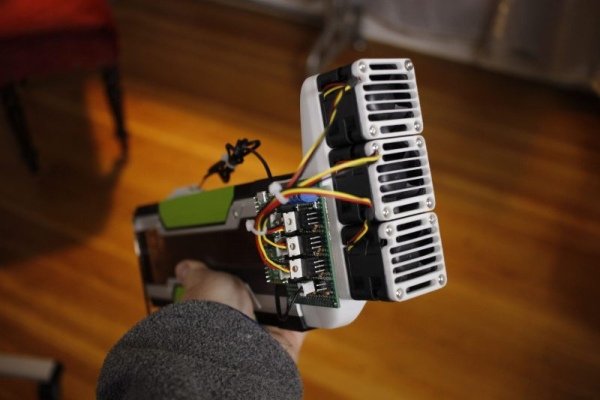
Bargains are still to be had in the second-hand market though. [Devon Bray] chanced upon a pair of Nvidia Tesla K80 cards, which are not suitable for gaming and no longer cost-effective for mining crypto, but ideal for [Devon]’s machine-learning calculations. However, he had to make a modification to enable proper thermal management, as these cards were not designed to be used in regular desktop PCs.
The reason for this is that many professional-grade GPU accelerators are installed in rack-mounted server cases, and are therefore equipped with heat sinks but no fans: the case is meant to provide a forced air flow to carry away the card’s heat. Simply installing the cards into a desktop PC case would cause them to overheat, as passive cooling will not get rid of the 300 W that each card pumps out on full load.
[Devon] decided to make a proper thermal solution by 3D printing a mount that carries three fans along with an air duct that snaps onto the GPU card. In order to prevent unnecessary fan noise, he added a thermal control system consisting of a Raspberry Pi Pico, a handful of MOSFETs, and a thermistor to sense the GPU’s temperature, so the fans are only driven when the card is getting hot. The Pi Pico is of course way more powerful than needed for such a simple task, but allowed [Devon] to program it in MicroPython, using more advanced programming techniques than would be possible on, say, an Arduino.
We love the elegant design of the fan duct, which enables two of these huge cards to fit onto a motherboard side-by-side. We’ve seen people working on the opposite problem of fitting large fans into small cases, as well as designs that discard the whole idea of using fans for cooling.
Source: 3D-PRINTED FAN MOUNT KEEPS SERVER GPU COOL IN DESKTOP CASE
- Why are professional-grade GPU accelerators not suitable for regular desktop PCs?
They lack fans and rely on forced air flow from rack-mounted server cases to dissipate heat. - How much heat do each of the Tesla K80 cards pump out on full load?
Each card pumps out 300 W of heat when running at full load. - What method did [Devon] use to create a proper thermal solution?
[Devon] used a 3D-printed mount that carries three fans along with an air duct. - How does the project prevent unnecessary fan noise?
The system uses a thermal control setup where fans are only driven when the card gets hot. - Which microcontroller was chosen for the thermal control system?
A Raspberry Pi Pico was used to sense temperature and drive the fans. - What programming language was used to code the Raspberry Pi Pico?
MicroPython was used to program the controller. - Why was the Raspberry Pi Pico selected over an Arduino?
The Pi Pico allowed for more advanced programming techniques than would be possible on an Arduino. - How many Tesla K80 cards can fit side-by-side using this design?
The elegant fan duct design enables two of these huge cards to fit onto a motherboard side-by-side.
