
Summary of The tweiger counter
This article guides users in building a "tweiger-counter," a device that monitors Twitter for specific keywords like "nuclear." It calculates a sliding window average of these tweets and uses an Arduino to trigger a Geiger counter-style clicker and a servo needle. The system includes optional audio feedback via a speaker and requires Python coding with Tweepy to connect to the Twitter API using OAuth credentials.
Parts used in the Tweiger Counter:
- Arduino
- Servo motor
- Little speaker (optional)
- Twitter developer account
- Tweepy package dependencies
- Cigar box or similar enclosure
- Text file named auth.txt
- Python script and Arduino sketch code
The following steps will enable you to build your own tweiger-counter! It searches in current twitter messages sent around the globe for the words like nuclear, calculates a sliding window average and pushes it to the arduino that will click for every incoming tweet like an original Geiger counter and will steer a servo as revmeter showing the current nuclear related posts on twitter. So the next time the twitter-verse is flooded by such tweets due to a new catastrophe you will be warned by an alarm of your tweiger-counter.
what you need:
– arduino
– servo
– little speaker (optional but cool)
– twitter developer account (sorry, but necessary since the recent API update of twitter, they cancelled basic auth)
(-some dependencies for the python script, mainly the tweepy package)
by the way, the code is flexible so can search for whatever words you want, so you can easily turn the tweiger counter into a yolo-meter or check for hurricanes…
Step 1: Coding-up
get the code for the python script & the arduino sketch from github:
https://github.com/leftbigtoe/tweiger_counter
in the same folder as the python script create a text file called auth.txt where you OAuth data:
1st line: consumer key
2nd line: consumer secret
3rd line: access token
4th line: acess token secret
it will be read in by the script to connect the tweiger-counter
Step 2: Wiring-up
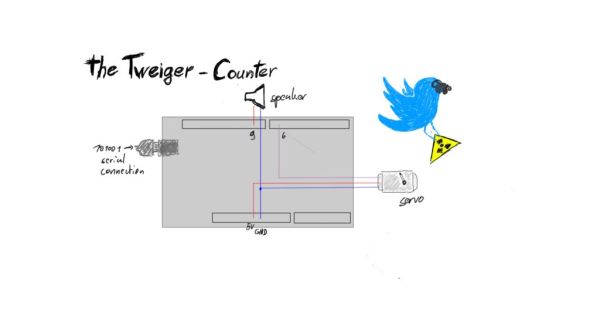
here is how you wire everything to the arduino. make sure you use the same pins or adapt the code.
Step 3: Suit up
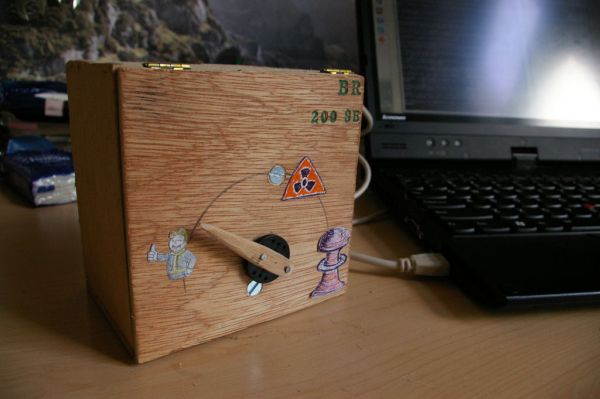
to make your tweiger counter look nice, just grab some box to put it in and add a nice hand and scale. no exact instructions here, but maybe some insipration:
I just went to the locale tabacco shop, got an empty cigar box (shrinked it down a little since it was a bit oversized) and made a hand I mounted to the servo.
For more detail: The tweiger counter
- How does the tweiger-counter work?
It searches global Twitter messages for specific words, calculates a sliding window average, and sends data to an Arduino to click and steer a servo. - What is required to connect the project to Twitter?
A Twitter developer account is necessary because basic authentication was cancelled due to recent API updates. - Can I search for words other than nuclear?
Yes, the code is flexible and can be changed to search for any words like yolo or hurricanes. - Where do I get the source code?
The python script and arduino sketch are available on github from the repository leftbigtoe/tweiger_counter. - What information must be stored in the auth.txt file?
The file needs four lines containing the consumer key, consumer secret, access token, and access token secret. - Is the speaker mandatory for the project?
No, the little speaker is optional but adds a cool effect when tweets are detected. - How should I enclose the device?
You can use a box like a cigar box and add a hand and scale mounted to the servo for a nice look. - Does the wiring require specific pins?
You must ensure you use the same pins mentioned in the guide or adapt the code accordingly.
