
Summary of A cicada warning system with Arduino
This spring, patches of the East Coast will buzz as periodical cicadas emerge after 13 or 17 years. Radiolab launched a DIY campaign using an Arduino UNO to monitor soil temperature; when it reaches 64°F (17.7°C), cicadas are expected to start emerging. The project follows a simple tutorial to record soil temperature and predict emergence.
Parts used in the A cicada warning system with Arduino:
- Arduino UNO
- Soil temperature sensor (thermistor or DS18B20 style sensor as used in tutorial)
- Breadboard
- Jumper wires
- Resistor(s) for sensor circuit
- USB cable for Arduino
- Power source (USB power or battery pack)
- Enclosure or protective housing for sensor and electronics
- Computer with Arduino IDE for programming
This spring, patches of the East Coast will turn buzzy and crunchy because of … bugs. Periodical cicadas (or Magicicadas) usually live underground but after 13 or 17 years, they emerge synchronously and in tremendous numbers to look for a mate. Radiolab launched a campaign to predict their arrival with a bit of DIY science and using an Arduino UNO.
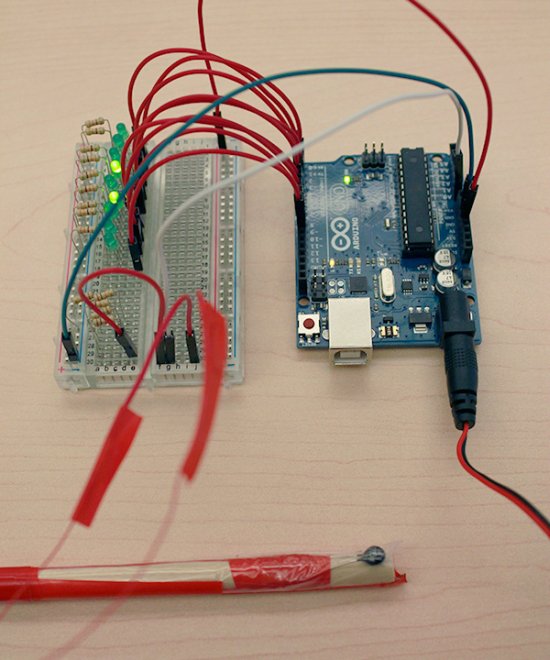
You can follow the instructions of the simple tutorial on how to monitor soil temperature until it reaches 64° F (17,7 C°) — when the cicadas should start to emerge.
For more detail: A cicada warning system with Arduino
- What is the purpose of the Arduino project?
To monitor soil temperature to predict when cicadas will start to emerge. - When do cicadas start to emerge according to the project?
When soil temperature reaches 64°F (17.7°C). - Which Arduino board is used in the tutorial?
The Arduino UNO is used. - What sensor is used to measure soil temperature?
A soil temperature sensor such as a thermistor or DS18B20 style sensor is used in the tutorial. - Do I need a computer to run the project?
Yes, a computer with the Arduino IDE is used to program the Arduino. - Can the system be powered without a computer?
Yes, the Arduino can be powered via USB power or a battery pack. - Is protective housing recommended for the setup?
Yes, an enclosure or protective housing for the sensor and electronics is recommended.
